

How to Setup Bilibili Account and Upload First Video
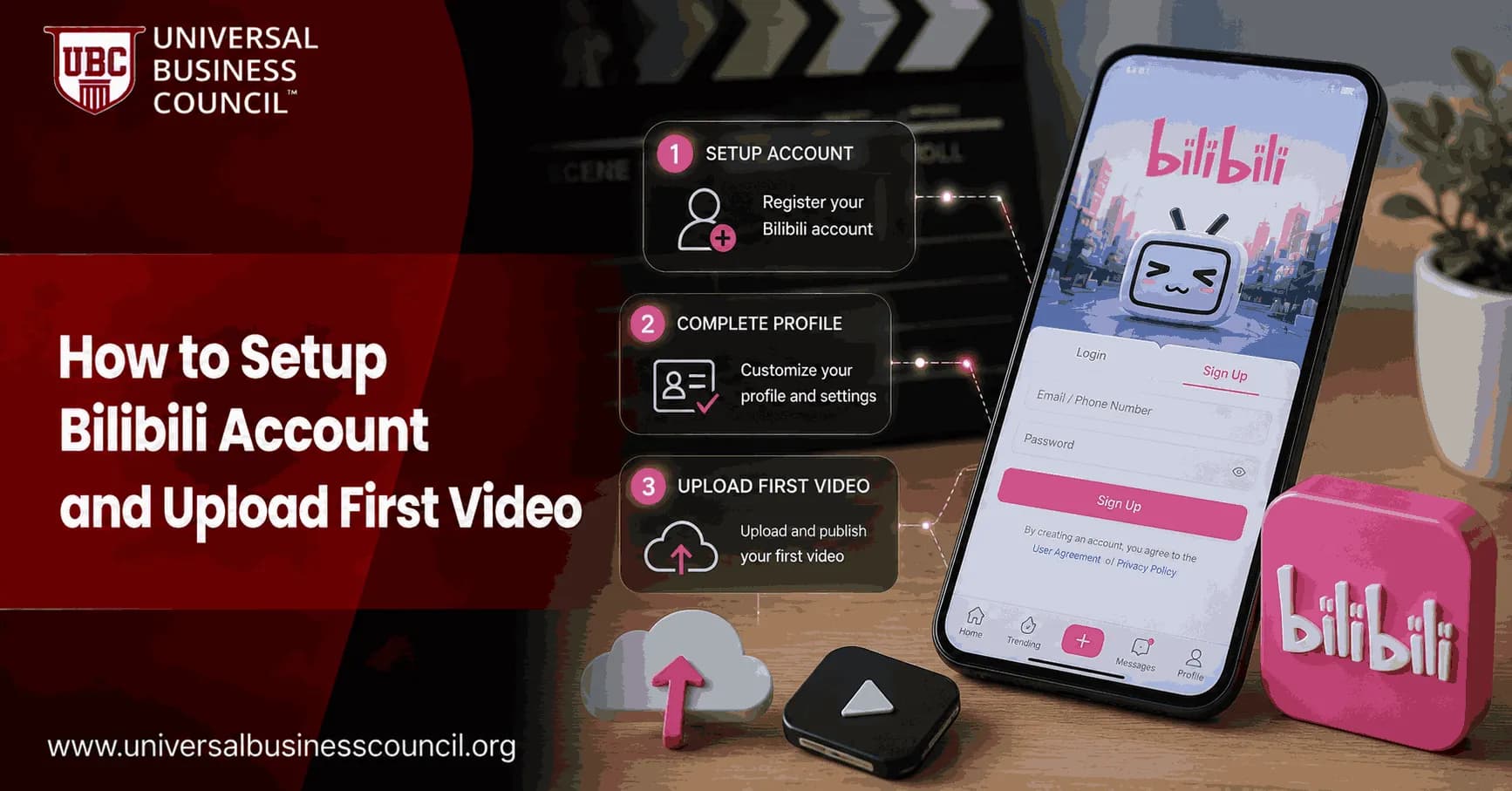
This walkthrough explains how to register a Bilibili account, personalize your profile, and submit your first video through the Bilibili Creator Center. For creators looking to build a stronger understanding of digital audiences and online communication, a Marketing Certification can complement practical content creation skills.
Part 1: Registering Your Bilibili Account
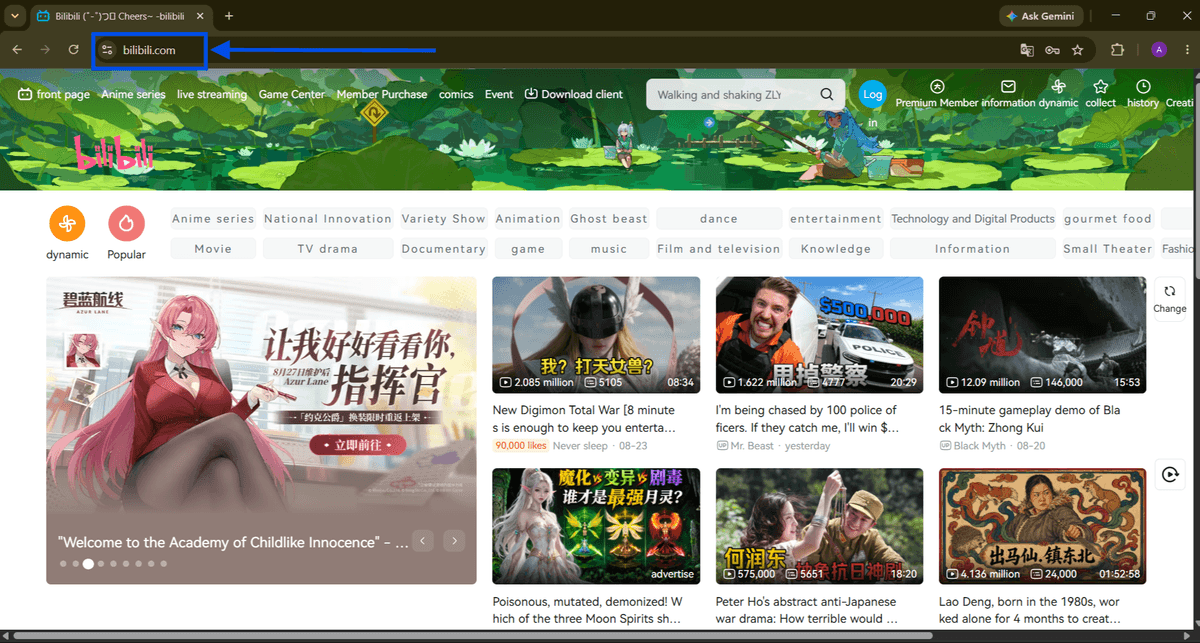
Step 1: Open the Bilibili homepage
Visit bilibili.com in your browser. The homepage is where you can explore content and access Bilibili's login and registration options.

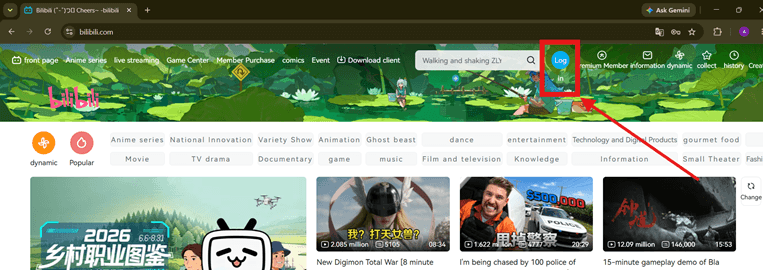
Step 2: Open the "Log in" window
Select the blue "Log in" button in the upper-right corner of the homepage to open the account access window.
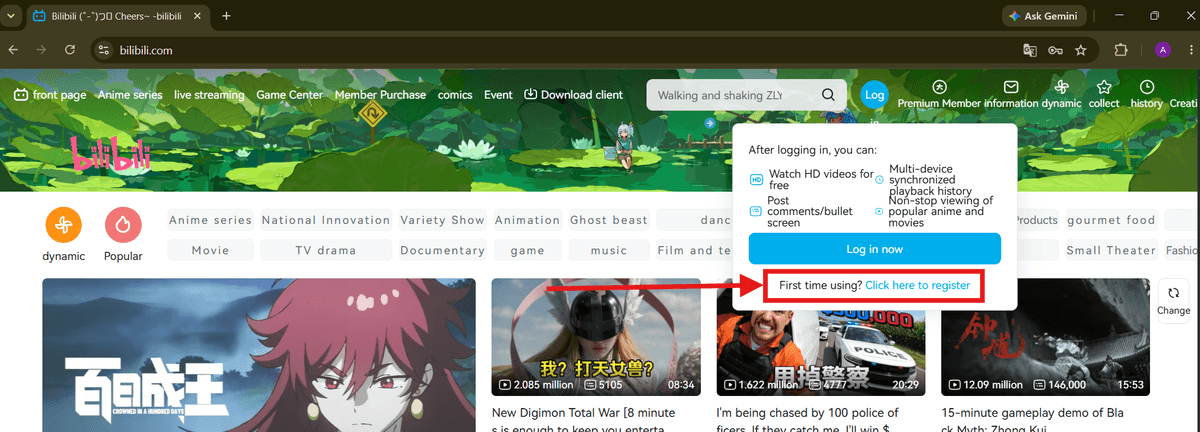
Step 3: Start a new registration
The pop-up provides QR code, password, and SMS login methods. For a new account, choose "First time using? Click here to register" and continue with phone/SMS registration.
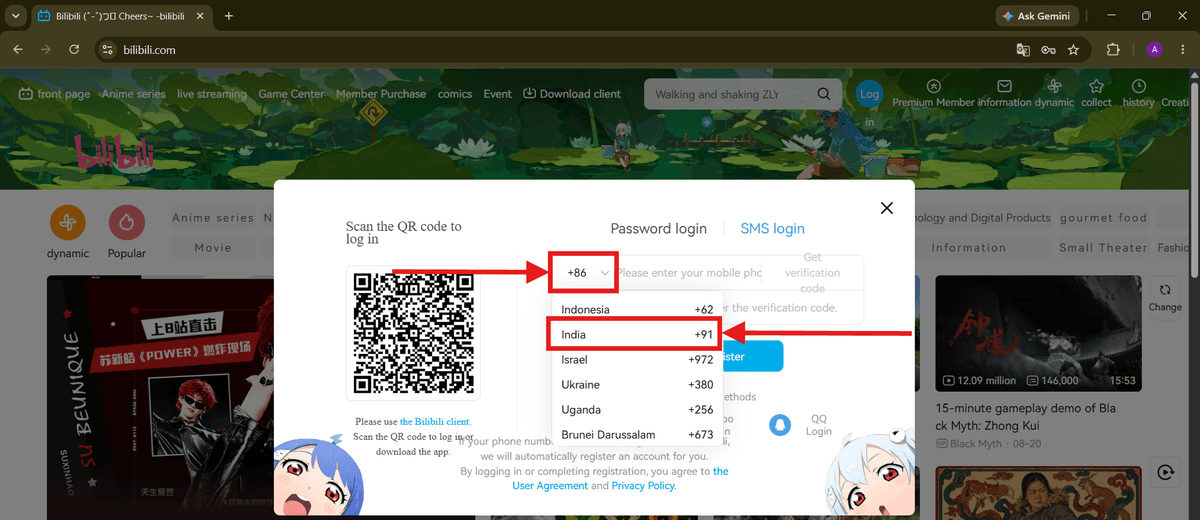
Step 4: Choose your phone country code
Open the country-code menu and select the code that matches your mobile number. The default may be +86 for China; for example, users in India can select +91.
Step 5: Verify your mobile number
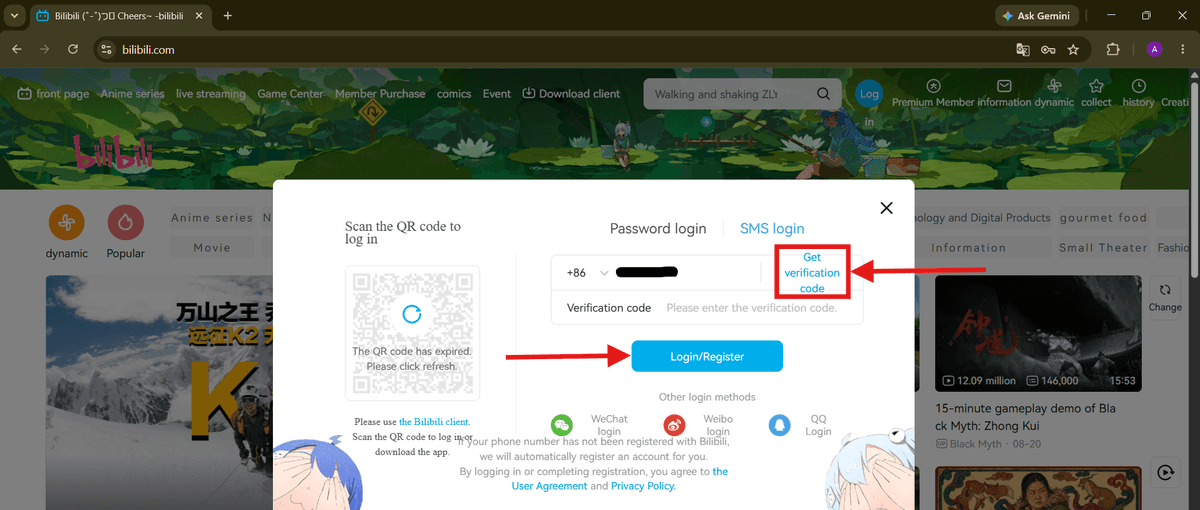
Enter your phone number and select "Get verification code." Type the SMS code into the verification field, then choose "Login/Register." If the number is new to Bilibili, the account is created during this process.
Part 2: Personalizing Your Profile
Step 6: Enter the Personal Center
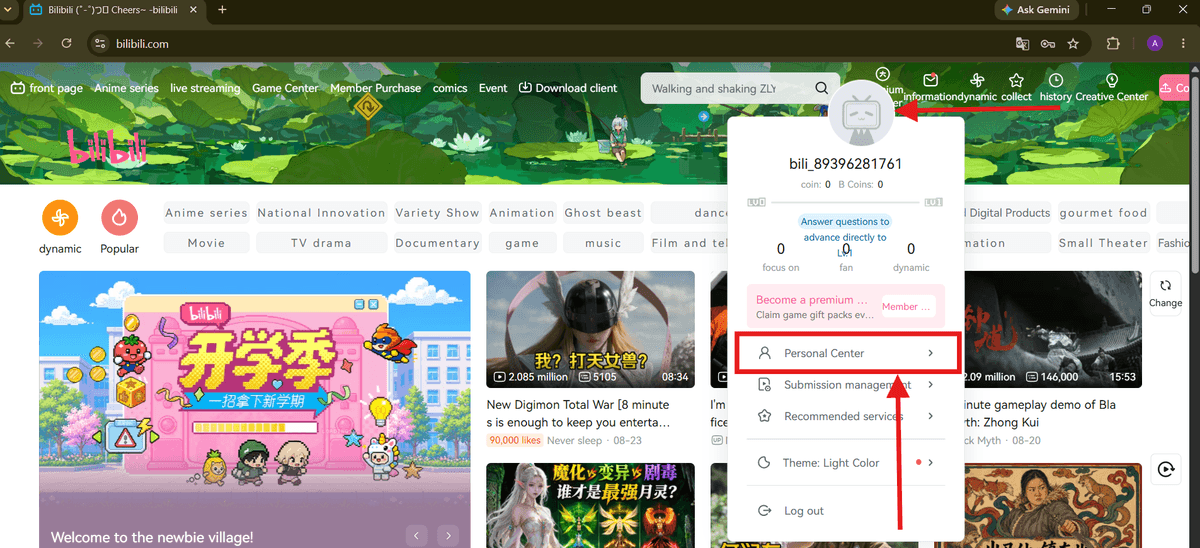
After signing in, select your avatar in the upper-right corner. From the dropdown menu, choose "Personal Center" to access your account and profile settings.
Step 7: Select "Edit data"
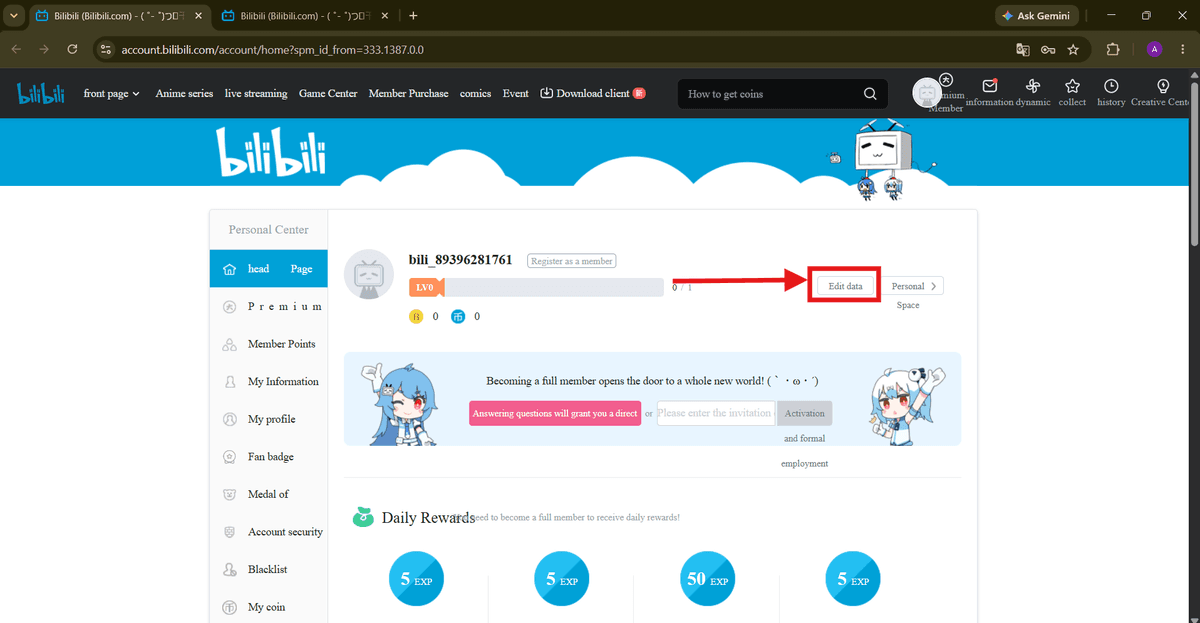
On the Personal Center page, choose "Edit data" beside your username and level information to begin updating your profile. As users become more familiar with digital platforms, developing broader technical knowledge can also be useful. A Tech Certification can support learners who want to expand their understanding of technology and related digital skills.
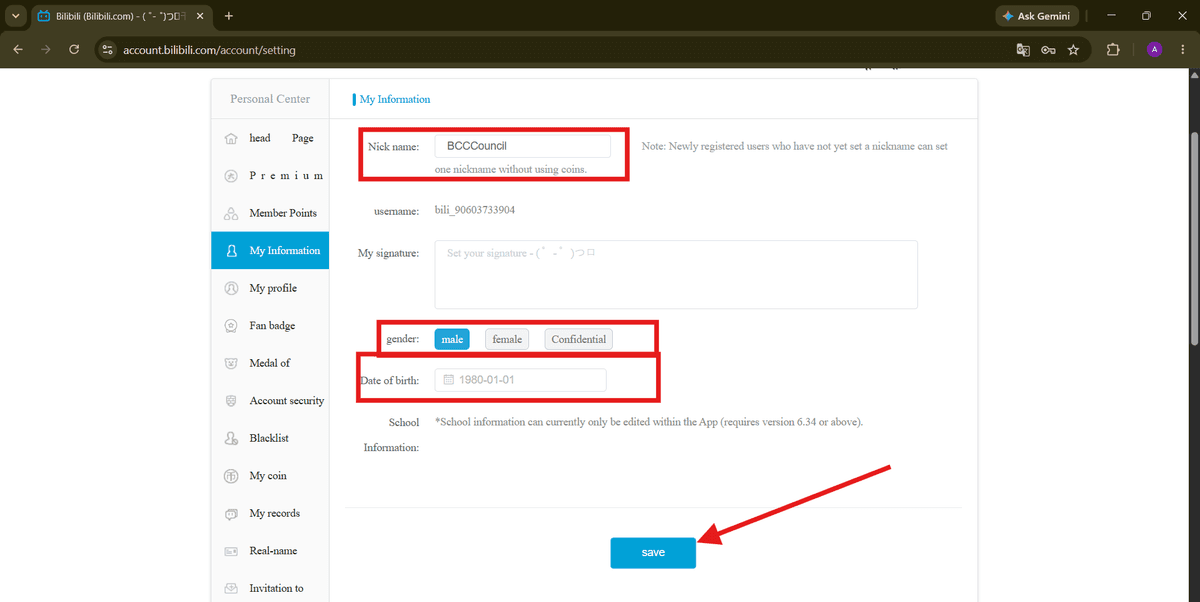
Step 8: Complete your basic information
Under "My Information," enter or update your nickname, gender, and date of birth. When finished, select "save" to apply the changes.
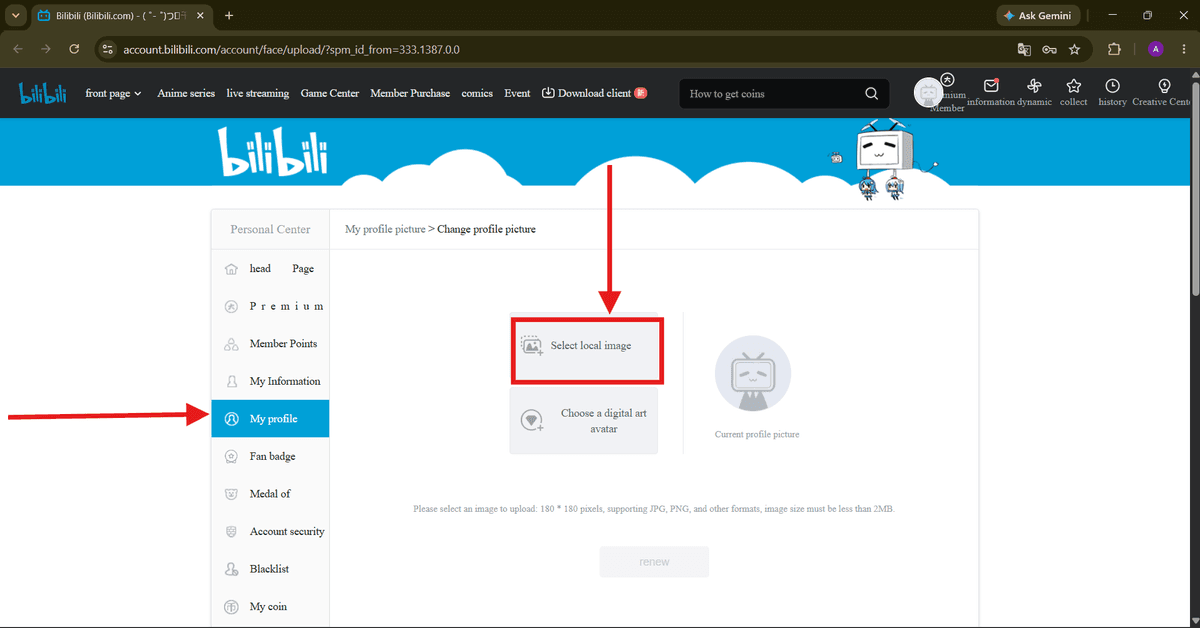
Step 9: Add a profile picture
Open the "My profile" section and select "Select local image" to upload a picture from your computer. The source guide recommends an image under 2 MB, ideally around 180 × 180 pixels.
Part 3: Uploading and Publishing Your First Video
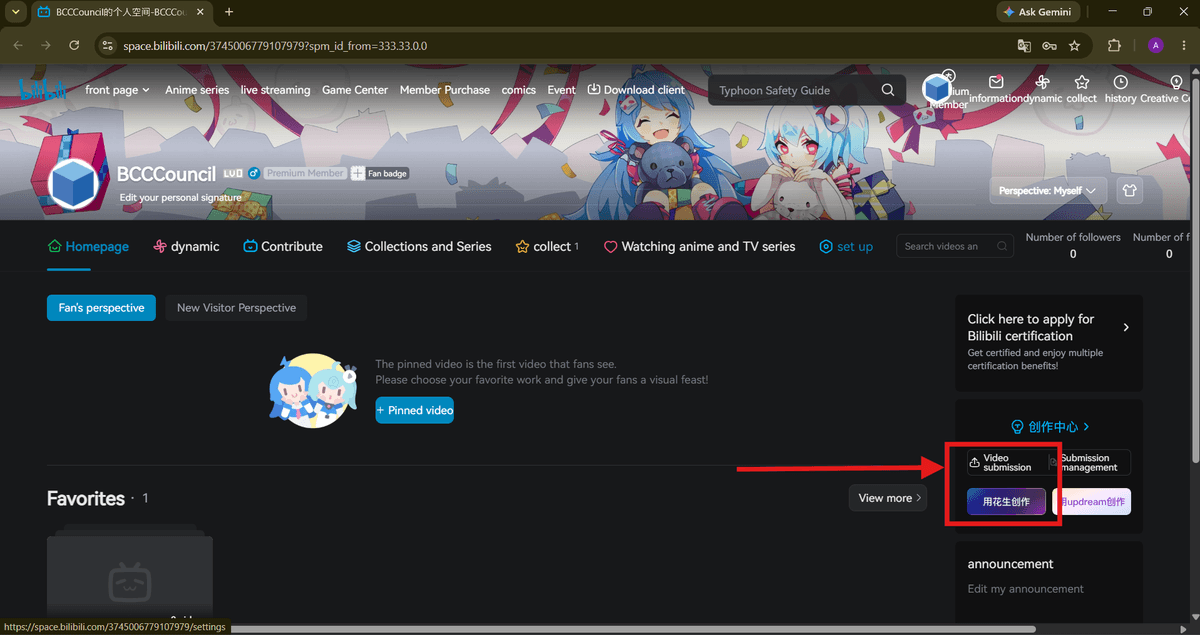
Step 10: Open Video Submission
From the Personal Center, choose "Video submission" or the upload icon to enter the Bilibili Creator Center, where video uploads and submissions are managed.
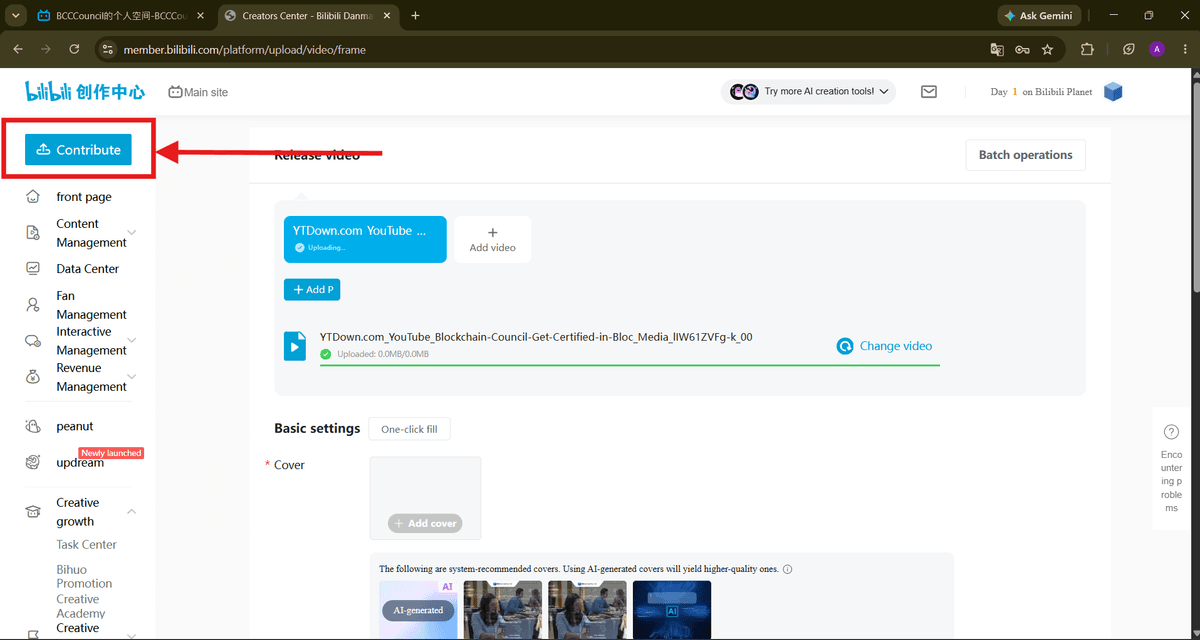
Step 11: Upload your video file
In the Creator Center, choose "Contribute" or "Add video," then select your video file. Wait until the upload finishes. You can also add a cover image in the "Basic settings" area.
Step 12: Complete the details and submit
Add the remaining information, including the video introduction or description. Review optional settings such as rights statements, video elements, and interaction management, then select the blue submission button to send the video for publishing.
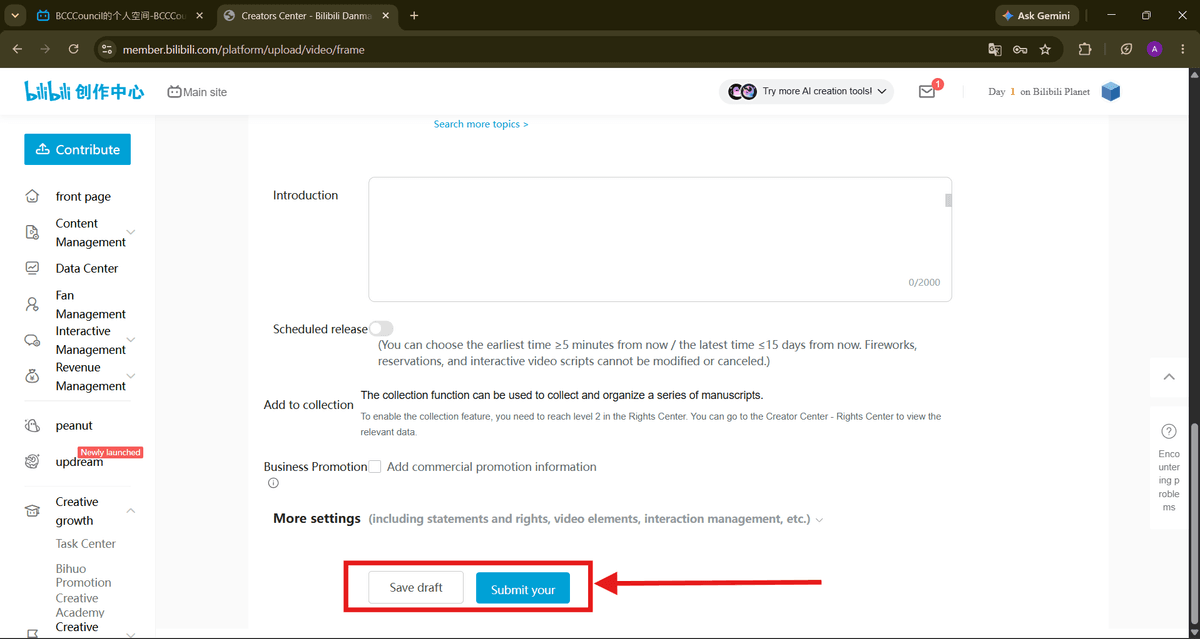
Finished! Your Bilibili account is configured and your first video has been submitted for publishing.
Future-Ready Skills
As technology becomes increasingly important across industries, students need opportunities to develop future-ready skills early in their education. A Tech Olympiad can introduce students to areas such as artificial intelligence, coding, cybersecurity, robotics, and computational thinking while encouraging curiosity and continuous learning.
As creators continue using platforms such as Bilibili to publish and share digital content, understanding emerging technologies can also help them adapt to changing online environments. A Deep Tech Certification can provide an opportunity to explore advanced technology concepts and build knowledge that extends beyond basic content publishing.
FAQs
1. How do I set up a Bilibili account?
To set up a Bilibili account, visit the official Bilibili website or open the Bilibili app and select the available registration option. Depending on your region, registration may support a phone number, email address, or supported third-party account. Follow the verification steps to complete account creation.
2. Can I set up a Bilibili account outside China?
Yes. Bilibili offers services to international users, although available registration methods and features can vary by location. International users should follow the registration options provided by Bilibili for their region.
3. What do I need to create a Bilibili account?
Depending on the available registration method, you may need a phone number, email address, or supported third-party account. You should also provide accurate information and keep your account credentials secure.
4. Do I need a phone number to create a Bilibili account?
Not always. Bilibili's international terms list phone numbers, email addresses, and certain third-party accounts as possible registration methods. The options available to you may depend on your location and Bilibili's current registration system.
5. Can beginners create a Bilibili account?
Yes. Beginners can create an account and explore Bilibili's content and creator features. Once the account is established, you can personalize your profile and, where the feature is available, access video publishing tools.
6. How do I set up my Bilibili profile?
After creating your account, you can personalize your profile with information such as a username, profile picture, and introduction. Use information that accurately represents your content or creator identity.
7. How do I upload my first video to Bilibili?
For international creators, Bilibili provides an official video-upload platform called Bilibili Studio. After signing in, select the video-upload option, choose your video file, complete the required information, and submit it for review.
8. Where can I upload my first Bilibili video?
International users can use Bilibili's dedicated Studio platform for video uploads. Bilibili's international FAQ directs creators to Bilibili Studio for uploading videos.
9. Can I upload my first Bilibili video from a computer?
Yes. You can use a computer browser to access Bilibili Studio, sign in, upload your video, add the required publishing information, and submit the content.
10. Can I upload my first Bilibili video from a mobile phone?
Yes. Bilibili's mobile application provides publishing functionality. The exact interface can change with app updates, so use the upload or publish option currently displayed in the official app.
11. What should I prepare before uploading my first Bilibili video?
Before uploading, prepare:
A finished video file
An engaging and accurate title
A suitable thumbnail
A concise description
Relevant tags
The appropriate category
Copyright or source information when applicable
Preparing these elements in advance can make your first upload smoother.
12. How should I title my first Bilibili video?
Create a clear, descriptive, and relevant title that tells viewers what the video is about. Include your primary topic naturally rather than repeating keywords excessively. Avoid misleading titles that promise something the video does not provide.
13. How do I choose a thumbnail for my first Bilibili video?
Choose a thumbnail that accurately represents your content and is easy to understand at a glance. A simple design with a clear subject and readable text can help communicate the video's topic effectively.
14. How do I add a description to my Bilibili video?
Use the description to briefly explain what the video covers and what viewers can expect. Include relevant keywords naturally and provide additional context when useful. Avoid excessive keyword repetition or misleading information.
15. Can I add tags to my Bilibili video?
Yes, where tags are available during the publishing process. Choose tags that accurately describe your video's subject, format, or audience. Relevant tags are more useful than adding unrelated popular keywords.
16. What video format can I use for my first Bilibili upload?
Bilibili supports multiple video formats, but file-size, resolution, encoding, and other upload requirements can change. Check the current requirements displayed in Bilibili Studio when uploading your video.
17. How long does Bilibili take to review the first video?
Your video may need to undergo processing and platform review before it becomes publicly available. The review time can vary depending on the content and current platform conditions, so there is no fixed timeframe that applies to every upload.
18. Why is my first Bilibili video under review?
A submitted video can remain under review while Bilibili processes and checks it. Issues involving content, copyright, metadata, or platform requirements can affect whether the video is approved or requires changes.
19. Can I upload copyrighted content as my first Bilibili video?
You should upload only content that you created yourself or have permission or appropriate rights to distribute. Bilibili's international terms require users to have the necessary rights or licenses for content they upload.
20. What is the easiest way to set up a Bilibili account and upload my first video?
The basic process is:
Create your account → verify your account → complete your profile → prepare an original video → open Bilibili Studio → upload the video → add the title, thumbnail, description, category, and tags → review the details → submit the video for review.
Related Articles
View All
Blogs
Bilibili: A Complete Guide to the Popular Video-Sharing Platform
Bilibili is a popular Chinese video-sharing and entertainment platform featuring user-generated videos, livestreams, anime, gaming, and creator communities. This guide explores how Bilibili works, its key features, audience, content ecosystem, and business model.

Blogs
How to Create a Content Calendar for Social Media?
A content calendar for social media is a simple plan that helps you organize, schedule, and publish posts consistently. It’s your roadmap to keeping your audience engaged and your brand active. This guide shows beginners exactly how to create a content calendar step by step. Why a Content Calendar…

Blogs
How to Start an Email Newsletter for Beginners?
Starting an email newsletter is one of the best ways to build a relationship with your audience, share updates, and grow your business. If you’re new to this, don’t worry. This guide will show you exactly how to start an email newsletter from scratch. Why You Need an Email Newsletter Email…
Trending Articles
The Role of Blockchain in Ethical AI Development
How blockchain technology is being used to promote transparency and accountability in artificial intelligence systems.
AWS Career Roadmap
A step-by-step guide to building a successful career in Amazon Web Services cloud computing.
Top 5 DeFi Platforms
Explore the leading decentralized finance platforms and what makes each one unique in the evolving DeFi landscape.