

AI Risk Register Template: Recording Risks, Owners and Mitigations
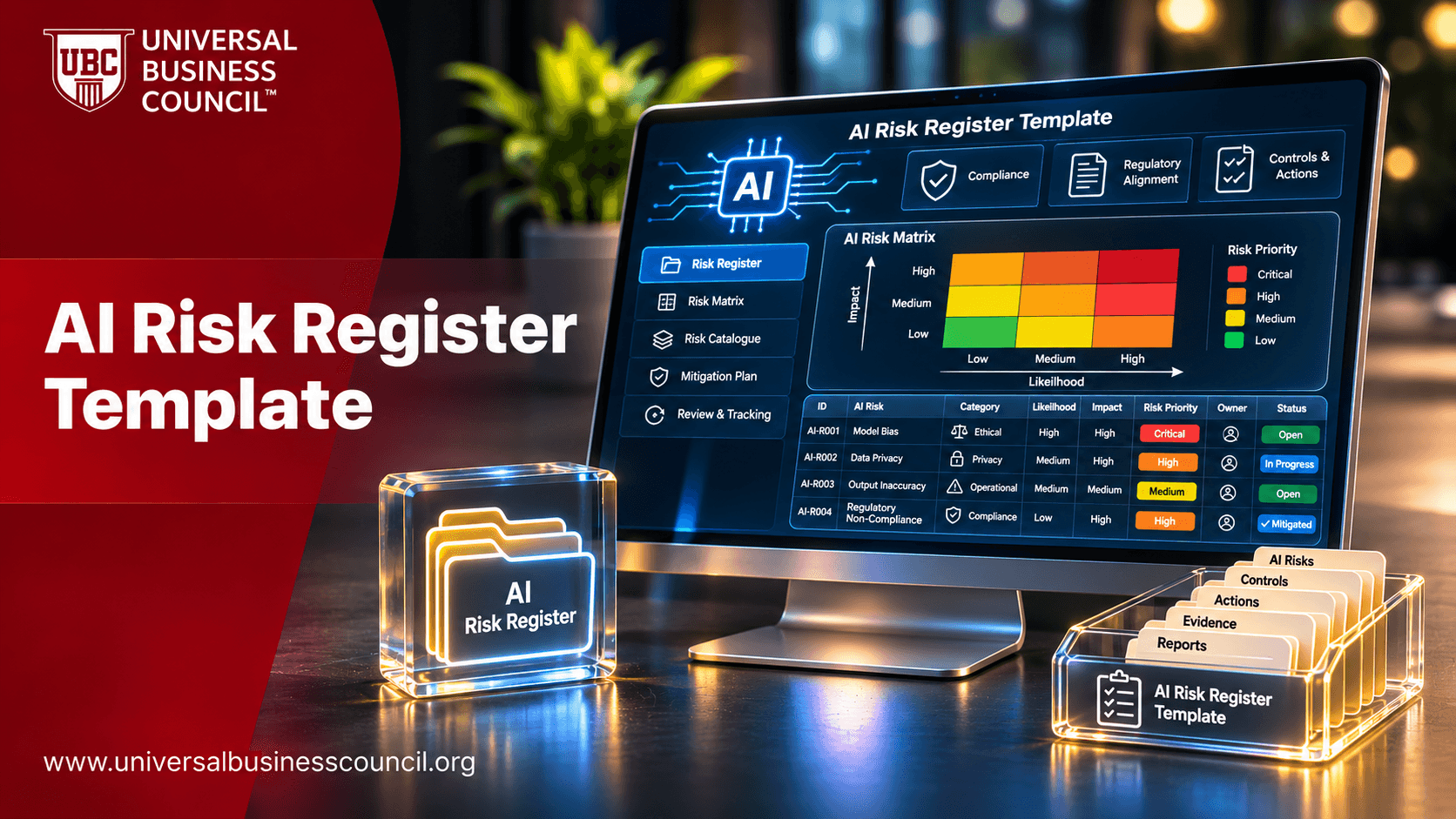
The risk register is the governance document that nearly every AI program ends up relying on. It is where risks are named, rated, assigned to owners and tracked until they are reduced or accepted, and it is often the first thing an auditor, insurer or board member asks to see. A weak register is a list of worries. A strong one is a working management tool. This guide offers an AI risk register template, explains each field, shows a worked example and gives advice on keeping the register alive. For professional learning in the field, see the certified responsible AI expert certification. This is general information, not legal advice.
What is an AI risk register?
An AI risk register is a structured record of the risks associated with an organization's AI systems and uses. Each entry describes a risk, rates its likelihood and impact, names an owner, lists existing controls and planned mitigations and tracks status. It can sit at the level of the whole organization, a business unit or a single high-risk system.

It complements the AI inventory, which lists what you have, and the impact assessment, which examines a specific system in depth. The register pulls the key findings together so that leaders can see and manage risk across the portfolio.
Template fields
Keep the template simple enough that people will use it. These fields cover what most organizations need.
Identification fields
Risk ID: a unique reference for tracking
AI system or use case: which system the risk relates to, linked to the inventory
Risk title and description: a clear statement of what could go wrong, why and to whom
Risk category: for example bias and fairness, privacy, security, safety, reliability, transparency, legal and regulatory, third-party or reputational
Assessment fields
Record the likelihood and impact on a consistent scale, such as one to five, then calculate or assign an overall rating. Include a note on the basis for the rating, such as test results or incident history. Record the inherent risk before controls and the residual risk after controls, so that the effect of mitigation is visible.
Treatment fields
Record existing controls, planned mitigations, the chosen response (reduce, transfer, avoid or accept), the owner of each action, target dates and current status. For accepted risks, note who approved acceptance and on what basis.
Monitoring fields
Record the indicators that show whether the risk is changing, the review date, the date last updated and links to evidence such as test reports, assessments or incident records.
Optional fields
Depending on your needs, add legal obligations affected, affected groups, vendor involved, regulator notification duties or links to related risks.
Writing good risk entries
Quality depends on the writing and the thinking behind it.
Be specific
Describe the event, cause and consequence: "Because training data under-represents some groups, the model may perform worse for them, leading to unfair denials and complaints." Vague entries cannot be rated or mitigated.
Rate consistently
Define the likelihood and impact scales, including what each level means in terms of people harmed, legal exposure and business effect. Have more than one reviewer calibrate ratings. Technical staff who contribute evidence benefit from solid foundations, which many develop through tech certifications.
Assign real owners
An owner should be a named person with the authority and resources to act, not a department. Confirm that owners and approvers hold the roles and qualifications they claim, using verification such as HireValid where credential checks are appropriate.
Link to controls and evidence
Each mitigation should connect to something verifiable, such as a test, a policy, a contract clause or a monitoring metric. Claims without evidence weaken the register.
Keeping the register alive
Registers fail when they become stale.
Set a review rhythm
Review high risks frequently and others on a schedule. Update entries when systems change, incidents occur, new regulations apply or monitoring signals shift. Close risks only with evidence.
Connect to governance
Feed the top risks into leadership reporting and the enterprise risk register, and link them to your dashboard indicators. Make the register part of approval gates, so that no higher-risk system launches without entries and mitigations.
Protect integrity
Control who can edit entries, and keep a change history with timestamps and approvals. Tamper-evident approaches connect to topics in deep tech certifications.
Share carefully
The register may contain sensitive information about weaknesses, so restrict access, and prepare shorter summaries for external audiences. When describing risk management publicly, avoid overstatement, and consider a digital marketing course for teams that shape external messaging.
Conclusion
An AI risk register turns scattered concerns into a managed portfolio. Use a template with identification, assessment, treatment and monitoring fields, write specific risk entries, rate them consistently and assign real owners with linked evidence. Keep the register current through regular reviews, connect it to governance and reporting and protect its integrity. It is one of the most practical documents you can hand to an auditor, a regulator or your own board.
Frequently asked questions
These are the questions teams ask most about AI risk registers.
1. What is an AI risk register?
A structured record of AI risks, ratings, owners and mitigations.
2. How is it different from an inventory?
The inventory lists systems, and the register tracks their risks.
3. How is it different from an impact assessment?
An assessment examines one system in depth, and the register summarizes risks across systems.
4. What fields should it have?
ID, system, description, category, ratings, owner, mitigation, status and review date.
5. What is inherent risk?
The risk before controls are applied.
6. What is residual risk?
The risk that remains after controls.
7. How do we rate likelihood and impact?
Use defined scales with clear meaning at each level.
8. What are the risk response options?
Reduce, transfer, avoid or accept.
9. Who can accept a risk?
A named authority whose level matches the risk.
10. Who should own a risk?
A named person with authority and resources to act.
11. How specific should entries be?
They should state event, cause and consequence.
12. Which categories should we use?
Bias, privacy, security, safety, reliability, transparency, legal, third-party and reputation.
13. How often should we review it?
Frequently for high risks, and on a schedule for others.
14. When should entries be updated?
After system changes, incidents, regulatory changes or monitoring signals.
15. When can a risk be closed?
When evidence shows it is mitigated or no longer applies.
16. Should vendor risks be included?
Yes, with links to due diligence and contract terms.
17. How does it connect to enterprise risk?
Feed the top AI risks into the enterprise register and reporting.
18. Who should see the register?
Those who need it, with restricted access to sensitive detail.
19. Can a spreadsheet work?
Yes, to start, as long as it has controls and version history.
20. What is the biggest mistake?
Creating the register once and never updating it.
Related Articles
View All
Artificial Intelligence
AI Risk Management Audit: Identifying and Testing AI Risks
Understand how an AI risk management audit evaluates the way organizations identify, assess, monitor, and mitigate risks associated with AI systems. Explore the audit process, key risk areas, assessment methods, and how regular audits support responsible AI practices and stronger risk controls.

Artificial Intelligence
AI Audit vs AI Assessment vs AI Risk Assessment: Key Differences
Understand the differences between an AI audit, AI assessment, and AI risk assessment. Explore their purposes, processes, scope, and outcomes to learn when organizations should use each approach to evaluate AI systems, identify risks, and strengthen governance.

Artificial Intelligence
Synthetic Data for AI: Benefits, Privacy Risks and Governance
Explore how synthetic data supports AI development by providing artificial datasets for training, testing, and validation. Learn about its benefits, privacy risks, data quality challenges, and governance practices that help organizations use synthetic data responsibly while protecting sensitive information.
Trending Articles
The Role of Blockchain in Ethical AI Development
How blockchain technology is being used to promote transparency and accountability in artificial intelligence systems.
AWS Career Roadmap
A step-by-step guide to building a successful career in Amazon Web Services cloud computing.
Top 5 DeFi Platforms
Explore the leading decentralized finance platforms and what makes each one unique in the evolving DeFi landscape.