

What Is Claude Looping? A Complete Beginner's Guide
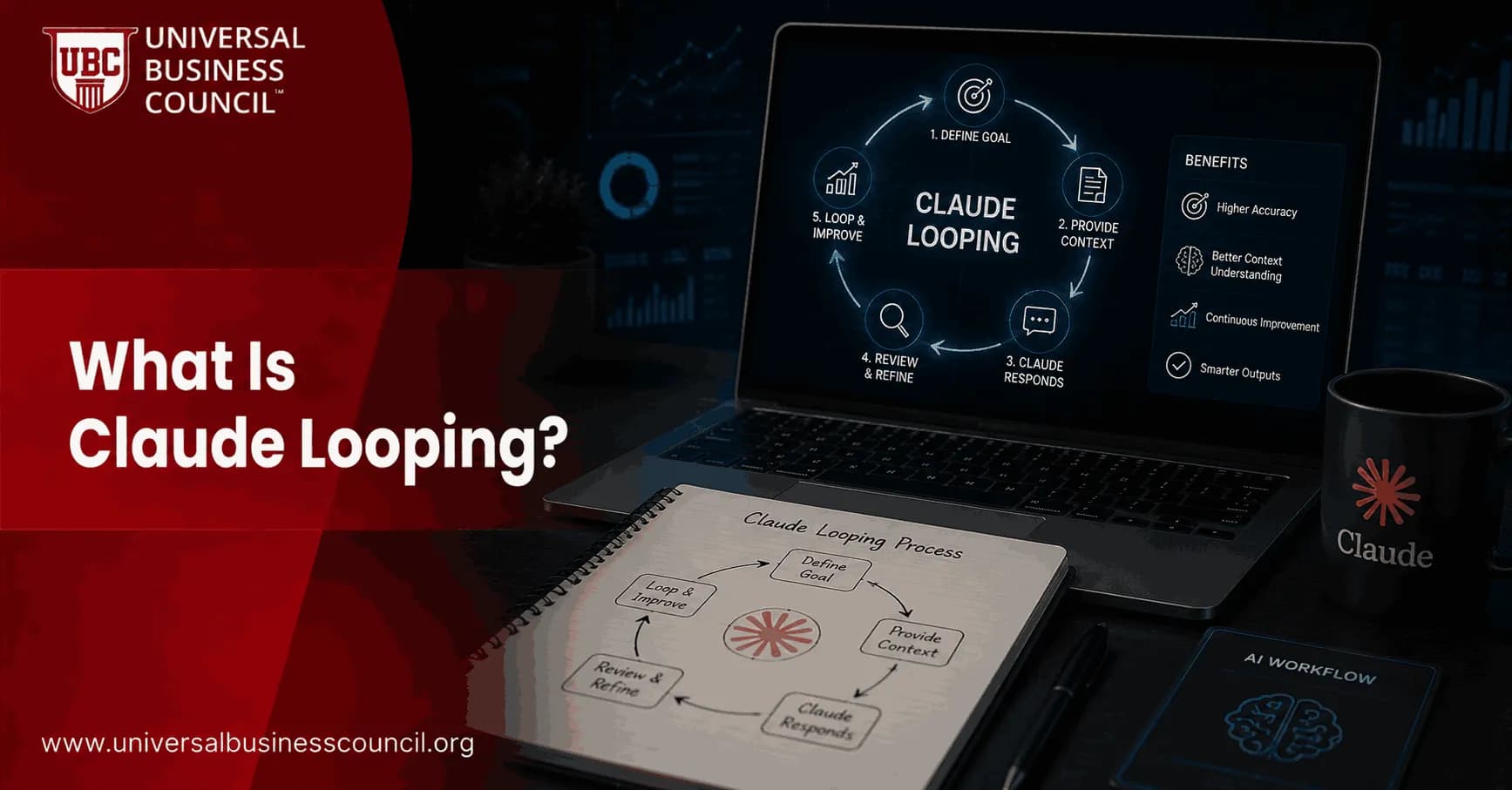
Imagine assigning a complex, multi-step task to a highly capable AI assistant and then walking away while it completes every stage autonomously, checks its own progress, and stops only when the goal is fully achieved. That is precisely what Claude Looping makes possible. Furthermore, this is not a futuristic concept it is a working methodology that professionals across business, marketing, and operations are already using in 2026.
Consequently, Claude Looping has become one of the most talked-about AI workflow techniques of the year. Specifically, it represents the shift from using AI as a reactive assistant one that responds to individual prompts to using it as an autonomous operator that runs structured workflows on a schedule, evaluates its own progress, and self-corrects without human intervention at every step.

Moreover, for business professionals, marketers, and entrepreneurs, understanding Claude Looping is becoming as important as understanding email automation once was. Those who hold a recognized Marketing Certification are increasingly expected to understand how AI automation fits into business strategy—and loop engineering is precisely where that intersection is most active in 2026. Therefore, this guide explains Claude Looping from the ground up, without assuming any technical background.
The Big Picture: Why Claude Looping Matters for Business Professionals
Before defining Claude Looping technically, it helps to understand the business problem it solves. Specifically, traditional AI tool usage creates a hidden productivity ceiling. Each time you ask an AI for help, you read the response, decide what to do next, and send another prompt. Consequently, you the human become the bottleneck in your own AI-assisted workflow.
Furthermore, consider how many repetitive, multi-step professional tasks follow a recognizable pattern. Reporting workflows, content pipelines, data audits, inbox management, and campaign monitoring all require the same basic cycle: check current state, identify what needs to happen, take action, verify the result, and repeat. Therefore, any task that follows this pattern is a candidate for Claude Looping.
Moreover, the scale of this opportunity is significant. According to Addy Osmani's June 2026 essay that introduced loop engineering to mainstream audiences accumulating 6.5 million views in days 'loop engineering is replacing yourself as the person who prompts the agent.' As a result, this framing captures exactly why business professionals, not just developers, need to understand this concept.
A Simple Business Analogy for Claude Looping
Think of Claude Looping like setting up an automated business process rather than manually completing the same task repeatedly. Specifically, a traditional AI interaction is like asking a staff member to complete one step of a project, reviewing their work, and then asking them to complete the next step every single time.
In contrast, Claude Looping is like giving that same staff member a complete brief with clear success criteria, the tools they need, and the authority to keep working until the defined outcome is reached then checking in only when they report that the job is done. Consequently, your attention is freed for the decisions that genuinely require your judgment. Therefore, loop engineering is fundamentally a leverage multiplier for anyone who manages workflows or oversees knowledge-work operations.
What Is Claude Looping? A Clear Definition
Claude Looping is the practice of designing a system that automatically and repeatedly invokes the Claude AI agent having it perform an action, evaluate the result against a defined success condition, and either continue iterating or stop without human intervention at each cycle. Specifically, it is the foundation of what the AI community in 2026 calls 'loop engineering.'
Furthermore, Claude Looping became a native, supported feature in June 2026 when Anthropic shipped built-in loop commands into its Claude Code product. Moreover, Boris Cherny, Head of Claude Code at Anthropic, made the methodology's importance explicit when he stated publicly: 'I don't prompt Claude anymore. I have loops running that prompt Claude and figuring out what to do. My job is to write loops.' Consequently, this statement from the creator of the platform itself confirmed that loop engineering is not a workaround but the intended paradigm for serious AI work.
Three Defining Characteristics of a Claude Loop
Every genuine Claude Looping workflow shares three defining characteristics. Specifically, understanding these helps distinguish real loop design from simply chaining prompts together manually.
Autonomy: The loop runs independently between initiation and completion, without requiring a human to review and re-prompt at each cycle. Consequently, the human's role shifts from operator to architect.
Verifiability: The loop has a defined, checkable success condition that a separate verification process evaluates after each iteration. Therefore, the loop stops when the condition is actually met—not when the AI assumes it is.
Self-Correction: When the success condition is not yet met, the loop incorporates the result of the previous iteration into the next attempt. Specifically, each cycle builds on what was learned before, rather than repeating the same action blindly.
Moreover, the presence of all three characteristics is what separates an engineered loop from a simple scheduled AI task. Consequently, professionals who understand these principles are equipped to design loop workflows that are reliable, cost-effective, and genuinely useful.
How Claude Looping Evolved: From Hack to Standard Practice
Understanding the short history of Claude Looping helps beginners appreciate why it became significant so quickly and why it is likely to remain a durable professional skill rather than a passing trend.
The Manual Prompting Era (2023–2024)
In the early years of modern AI tool adoption, professionals interacted with AI through individual prompts. Specifically, the dominant skill was writing better single instructions that produced higher-quality responses. Furthermore, practitioners learned to structure context carefully, assign roles, and format requests precisely to improve output quality.
However, this model had a clear ceiling. Specifically, every next step of a multi-stage task required the human to re-enter the cycle: read, decide, prompt, repeat. Consequently, the AI was productive but the human remained the bottleneck. As a result, productivity gains were genuine but bounded.
The First Loop: Geoffrey Huntley's Ralph Wiggum Technique (2025)
In July 2025, developer Geoffrey Huntley coined a technique he named the Ralph Wiggum method after the persistent, optimistic Simpsons character. Specifically, it was a Bash while loop that fed Claude the same prompt repeatedly until a task was completed. Furthermore, the insight was that a simple iterative structure could handle multi-step tasks without human supervision, as long as the task was well-scoped and the completion condition was clear.
Moreover, early practitioners reported mixed results the technique worked well for narrow, verifiable tasks but failed for open-ended or ambiguous goals. Consequently, the community began developing more sophisticated loop architectures, better verifier models, and structured approaches to goal definition. Therefore, the Ralph technique served as the proof of concept that made loop engineering a serious research and development priority.
Loop Engineering Goes Mainstream: June 2026
The pivotal moment arrived in June 2026. Specifically, Anthropic shipped native /loop and /goal commands into Claude Code with the release of version 2.1.139 on May 11, 2026, followed by dynamic workflow capabilities on May 28, 2026. Consequently, what had been a community-built workaround became a first-class product feature.
Furthermore, Addy Osmani published his foundational 'Loop Engineering' essay on June 7, 2026, which reached 6.5 million views and introduced the concept to a mainstream professional audience. Moreover, Peter Steinberger's summary 'You shouldn't be prompting coding agents anymore. You should be designing loops that prompt your agents' became the most retweeted AI methodology statement of the month. Therefore, Claude Looping crossed from specialist developer technique to widely recognized professional paradigm in a matter of days.
How Claude Looping Works: Explained for Non-Technical Professionals
Understanding the mechanics of Claude Looping does not require coding knowledge. Specifically, the underlying logic is identical to how any well-managed business process works and understanding it in those terms makes loop design far more accessible for business, marketing, and operations professionals.
The Five-Step Loop Cycle
Every Claude Looping workflow operates through a repeating five-step cycle. Specifically:
Step 1 — Define: The human writes a clear goal a specific, observable end state that describes exactly what 'done' looks like. This is the most important step. Without a precise definition of done, the loop cannot function reliably.
Step 2 — Execute: Claude takes action toward the goal using whatever tools and information are available. Specifically, this might involve reading files, calling APIs, analyzing data, drafting content, or running checks depending on the task.
Step 3 — Verify: A separate, independent verification process not the same AI that did the work checks whether the goal condition has been satisfied. Consequently, this separation prevents the system from prematurely confirming completion.
Step 4 — Continue or Stop: If the verifier returns a 'no,' the loop incorporates what was learned and tries again. If the verifier returns a 'yes,' the loop stops automatically. Furthermore, a turn cap or budget limit can also stop the loop to prevent runaway costs.
Step 5 — Report: The loop delivers findings, outputs, or a completion summary to the human through a file, a connected tool, an inbox, or a project board. Therefore, the human receives the results without having participated in any intermediate step.
Moreover, this cycle maps directly onto how any effective automated business process should work. Consequently, business professionals who have designed email automations, CRM workflows, or reporting pipelines will find the loop engineering mindset immediately familiar.
The Two Core Claude Loop Commands
For non-technical professionals, two commands are most immediately relevant in Claude Looping. Specifically:
/loop — Scheduled Repetition
The /loop command runs a defined prompt or task at a set interval—every hour, every day, every 30 minutes. Specifically, it is ideal for monitoring tasks, recurring reports, and any workflow that should run regularly on a schedule. Furthermore, it is analogous to a scheduled email report that fires automatically rather than requiring someone to manually compile and send it.
Example:
/loop every day at 9am: summarize yesterday's campaign performance metrics into a daily digest
/goal — Condition-Based Completion
The /goal command tells Claude what 'done' looks like and keeps it working until that condition is verified as true. Specifically, after every work cycle, a separate small AI model judges whether the goal has been met and returns a clear yes or no. Consequently, the loop stops on its own when the task is genuinely complete—without the human needing to check in.
Example:
/goal every product listing in the catalog has a complete description, title, and category tag, or stop after 30 turns
Furthermore, professionals who want to build both business and technical fluency around these systems benefit from investing in a recognized Tech Certification that covers AI systems architecture, automation governance, and the infrastructure principles that make loop-based workflows reliable and cost-efficient. Specifically, formal training bridges the gap between conceptual understanding and practical implementation confidence. Consequently, certified professionals design loops that work correctly from the first deployment rather than discovering critical gaps through expensive iteration.
Claude Looping in Practice: Business and Marketing Use Cases
One of the most important things to understand about Claude Looping is that its most valuable applications are not in software development they are in the kinds of repetitive, knowledge-intensive workflows that business professionals perform every day. Specifically, the following use cases represent areas where loop engineering delivers the most immediate value for non-technical professionals.
Marketing Operations and Campaign Management
Marketing teams deal with high volumes of repetitive, structured tasks that follow predictable cycles. Specifically, Claude Looping enables marketing professionals to automate the following workflows:
Daily Campaign Monitoring: A loop runs every morning, checks campaign performance data across platforms, flags metrics outside defined thresholds, and delivers a summary to the team's inbox—replacing hours of manual dashboard review.
Content Quality Auditing: A loop checks every product page, blog post, or landing page against defined quality criteria character count, required keywords, call-to-action presence—and stops only when all pages pass the audit.
Competitor Monitoring: A loop runs on a weekly schedule, identifies new competitor content, pricing changes, or campaign launches, and compiles findings into a structured briefing document.
Email Sequence Maintenance: A loop audits an existing email sequence for broken links, outdated offers, and formatting issues, then flags items needing human review.
Consequently, marketing professionals who build Claude Looping into their operational toolkit effectively gain the equivalent of an always-on analyst who never misses a shift, never needs briefing on past context, and costs a fraction of equivalent human oversight capacity.
Business Operations and Reporting
Operations professionals face a constant stream of repetitive reporting, data consolidation, and status monitoring tasks. Specifically, Claude Looping addresses these workflows directly:
Automated Status Reports: A loop aggregates data from connected tools and generates a weekly operational summary delivered to designated stakeholders without manual compilation.
Document Library Maintenance: A loop audits a document repository for outdated files, missing metadata, or broken links and stops only when the library meets defined completeness criteria.
Meeting Preparation: A loop runs before recurring meetings, retrieves relevant context from connected tools, and generates a briefing document with key metrics, open action items, and agenda-relevant data.
Invoice and Contract Monitoring: A loop checks for outstanding invoices, approaching contract renewal dates, and compliance document expirations on a scheduled basis.
Furthermore, each of these workflows shares the same loop architecture: a scheduled automation, a clear success condition, a verification step, and a delivery mechanism. Consequently, once a professional understands how to design one loop reliably, they can apply the same structure to dozens of workflows.
Sales and Customer Success Workflows
Sales and customer success teams manage high volumes of structured, repetitive touchpoints that are strong candidates for Claude Looping. Specifically:
Lead Research Automation: A loop runs through a prospect list, researches each company, and generates a tailored briefing for the sales team stopping only when every prospect has a complete research file.
CRM Data Quality: A loop checks CRM records for missing fields, duplicate entries, and outdated information, flagging records that need human correction.
Customer Feedback Processing: A loop categorizes incoming customer feedback, routes items to the appropriate team, and generates a weekly sentiment summary running on a daily schedule.
Consequently, sales professionals who adopt Claude Looping for these workflows typically find that the time freed from administrative tasks translates directly into more time for high-value client conversations.
Content and Creative Production Teams
Content teams deal with high-volume, structured production pipelines that benefit substantially from Claude Looping. Specifically:
SEO Audit Loops: A loop checks every page on a site against defined SEO criteria and stops only when all pages meet the required standard.
Content Repurposing: A loop works through a library of long-form content, generating social media variants, email summaries, and key quotes for each piece stopping when all items are processed.
Translation and Localization: A loop processes a content backlog for translation, checking each output against quality criteria and flagging items that require human review.
Brand Voice Consistency: A loop audits published content against brand voice guidelines, identifies deviations, and generates correction suggestions for editorial review.
Therefore, content teams that adopt loop engineering for production workflows effectively compress multi-day manual processes into overnight autonomous runs freeing creative capacity for strategy and ideation rather than bulk production tasks.
Key Concepts Every Beginner Must Understand
Several foundational concepts appear repeatedly in Claude Looping discussions. Specifically, understanding them helps beginners communicate clearly with technical collaborators and design more effective loop workflows from the start.
The Goal Condition: The Most Important Thing You Write
The goal condition defines what 'done' looks like in terms the verification process can evaluate unambiguously. Specifically, the difference between a useful goal and a useless one is precision. 'Improve the content' is not a verifiable goal. 'Every product description is between 150 and 200 words and includes a call to action' is a verifiable goal. Consequently, the quality of the goal condition is the primary determinant of whether a loop works reliably.
Furthermore, experienced practitioners describe the goal condition as the acceptance test the loop must pass before it is permitted to stop. Specifically, it should include the desired end state, the evidence required to prove success, any constraints that must not be violated, and a hard ceiling on iterations or budget. Therefore, writing the goal condition first before designing any other part of the loop is both the best practice and the most common characteristic of loops that succeed.
The Checker: Why Loops Cannot Grade Their Own Work
One of the most important structural principles in Claude Looping is the separation of the worker from the checker. Specifically, the same AI model that performs a task cannot reliably verify whether that task is complete it tends to confirm completion when outputs match the expected pattern, even when the underlying quality is insufficient.
Consequently, a reliable loop always includes a separate verification step in Claude Code's /goal command, this is handled automatically by Claude Haiku, a separate small model that judges the completion condition after every iteration. Furthermore, in manually designed loops, practitioners build an independent sub-agent whose only job is to evaluate outputs against the defined criteria. Therefore, 'the worker does not grade its own homework' is the single most important principle beginners can learn about loop reliability.
Memory: How Loops Remember What They Have Done
Claude Code begins every session with no memory of previous interactions. Consequently, a loop that runs overnight and then continues the next morning needs an external memory mechanism to avoid repeating completed work. Specifically, practitioners use a progress file typically a plain Markdown document outside the chat session that records what the loop has tried, what succeeded, what failed, and what remains open.
Furthermore, the habit of reading the progress file at the start of every loop run and updating it at the end is described by experienced practitioners as the single most impactful operational discipline in sustainable Claude Looping. Consequently, a loop with good memory picks up exactly where it stopped; a loop without it wastes time and budget re-discovering completed work.
Token Cost Awareness: The Business Case for Closed Loops
Every interaction in a Claude Looping workflow consumes API tokens—and costs compound significantly as loop iterations accumulate context. Specifically, a simple, well-scoped loop with 20 iterations might cost under one dollar in API usage. In contrast, an open-ended exploratory loop running 200 iterations with large files in context can cost $80 or more.
Consequently, business professionals adopting loop engineering should always start with tightly scoped, closed loops those with specific, verifiable stopping conditions and conservative iteration caps. Furthermore, monitoring token consumption for the first few days of any new loop allows realistic cost modeling before scaling up. Therefore, treating loop design as a business process investment with measurable cost and return is both the appropriate and the most successful framing for non-technical adopters.
The Six Building Blocks of a Professional Claude Loop
Addy Osmani's widely adopted framework identifies six components that every reliable Claude Looping system needs. Specifically, these map onto the features built into Claude Code and provide a useful mental model for business professionals designing their first automated workflows.
1. Automations: The Trigger That Starts Without You
Automations are scheduled or event-based triggers that initiate the loop without human intervention. Specifically, a loop triggered by a timer fires every morning at 9am without anyone pressing a button. Furthermore, a loop triggered by a Git event activates automatically when code is pushed to a repository. Consequently, automations are what transform a loop from something you run into something that runs itself.
2. Memory: The Progress File That Bridges Sessions
Memory is the external record of what the loop has done across multiple sessions. Specifically, because Claude has no persistent memory between sessions, a progress file written in plain Markdown records what was completed, what failed, and what still needs attention. Consequently, when the loop resumes after a break, it reads the progress file first and picks up from where it stopped. Therefore, a loop without memory repeats; a loop with memory progresses.
3. Skills: Standing Instructions That Eliminate Repetition
Skills are saved instruction sets stored in a designated file (SKILL.md) that teach the loop how a specific team or organization handles a particular type of task. Specifically, instead of re-explaining company conventions in every loop run, a skill file makes them persistent. Furthermore, skills are the mechanism that makes a loop behave like a trained team member rather than a confused new hire at the start of every session. Consequently, investing time in writing good skill files dramatically improves loop output quality over time.
4. Connectors: Links to the Tools You Already Use
Connectors are integrations that give the loop access to the business tools an organization actually uses email systems, CRM platforms, project management boards, content libraries, and communication tools. Specifically, a loop with the right connectors can update a project board, send a Slack notification, draft an email, or retrieve CRM data without any human intermediary. Consequently, connectors are what transform a loop from a file-processing tool into a genuine workflow automation system.
5. Sub-Agents: Separating Work from Verification
Sub-agents are separate AI instances that perform specific parts of a loop workflow. Specifically, the most important sub-agent pattern separates the maker the agent that produces the work from the checker the agent that verifies the output against the defined criteria. Consequently, this separation prevents self-confirmation bias, where the same model that produced the output also judges it acceptable. Therefore, any loop with high reliability requirements should implement a maker-checker sub-agent pattern.
6. Worktrees: Isolation for Parallel Operations
When a loop deploys multiple sub-agents to work on parallel tasks simultaneously, those agents need isolated working environments to prevent conflicts. Specifically, Git worktrees provide each agent with its own branch and working directory within the same repository. Consequently, parallel agents can work simultaneously without overwriting each other's progress—enabling large-scale parallel task execution that would be impossible in a shared environment.
Five Mistakes Beginners Make with Claude Looping
Learning from others' early experiences with Claude Looping protects beginners from the most common and costly failure patterns. Specifically, five mistakes appear consistently across community documentation and practitioner discussions in 2026.
Mistake 1: Writing a Process Goal Instead of an Outcome Goal
'Audit the content' is a process. 'Every page in the site has a meta description between 120 and 155 characters' is an outcome. Specifically, the checker model can only evaluate whether a condition is true or false it cannot judge whether a process is 'done.' Consequently, loops with process goals run indefinitely or stop arbitrarily. Therefore, always frame the goal as the desired state of the world after the task is complete.
Mistake 2: Running the Loop Without a Turn Cap
A loop without a turn cap will run until the goal is met or indefinitely if the goal is never achievable. Specifically, beginners sometimes design goals that are unclear enough that the checker can never confidently return 'yes,' causing the loop to consume tokens and budget until manually stopped. Consequently, always include a hard ceiling on iterations in every goal condition, particularly during initial testing. Therefore, 'or stop after 25 turns' is not optional it is a safety mechanism.
Mistake 3: Neglecting the Progress File
Running a Claude Looping workflow across multiple sessions without a progress file is like asking a team member to resume a project after a holiday without any handover notes. Specifically, the loop will re-discover what was already done, re-attempt what already failed, and potentially undo completed work. Consequently, maintaining a progress file that records completed items, failed attempts, and open tasks is not optional for any loop that runs across multiple sessions it is the foundational infrastructure of sustainable loop operation.
Mistake 4: Ignoring Token Cost Accumulation
Every tool call in a Claude Looping workflow adds context that is re-sent to the model on every subsequent turn. Specifically, a loop with file reads in context can accumulate 50,000 or more input tokens per call by iteration 20. Consequently, beginners who do not monitor usage can generate significant unexpected API costs within a single overnight loop run. Therefore, start with slow cadences, tight iteration caps, and active monitoring of consumption before scaling any loop workflow.
Mistake 5: Automating Without a Human Review Checkpoint
Fully automated loops that modify live systems, publish content, or update records without any human review point are risky for all but the lowest-stakes tasks. Specifically, even well-designed loops encounter edge cases, ambiguous situations, and unexpected data that no goal condition fully anticipates. Consequently, experienced practitioners recommend maintaining at least one human review checkpoint for any loop output that affects production systems, public content, or client-facing communications. Therefore, 'automate the repetitive, review the consequential' is the guiding principle.
Advanced Claude Looping Concepts: When You Are Ready to Go Deeper
Once the fundamentals are solid, several more sophisticated concepts distinguish practitioners who design genuinely scalable Claude Looping systems from those who build fragile, one-off automations. Specifically, these concepts become relevant as loops grow in scope, run time, and organizational impact.
Dynamic Workflows: When One Loop Becomes Many
Shipped in Claude Code version 2.1.154 on May 28, 2026, dynamic workflows allow the AI itself to decompose a complex task, write the execution plan, and distribute work across dozens to hundreds of parallel sub-agents simultaneously. Specifically, this capability accessed through the ultracode keyword enables large-scale workflows that no single agent could handle within a single context window.
Furthermore, dynamic workflows are particularly powerful for large content audits, multi-system migrations, and any task where parallel processing would deliver significant time compression. Consequently, a workflow that would take a single-agent loop days to complete can be executed in hours through parallel sub-agent orchestration. However, token costs scale proportionally with the number of parallel agents making cost discipline even more important at this level.
Context Compaction: The Skill That Keeps Loops Efficient
As a Claude Looping workflow accumulates context across iterations, the model receives more information on each subsequent call increasing both cost and the risk of output degradation as the context window fills. Consequently, context compaction the active management of what information the model carries into each new turn is a critical skill for running cost-efficient, high-performance loops over many iterations.
Specifically, effective context management involves using the progress file to store completed work outside the active context, summarizing rather than preserving full outputs between iterations, and periodically refreshing the agent's context to remove accumulated noise. Therefore, practitioners who master context compaction run loops that maintain quality and stay within budget across hundreds of iterations.
Certification for Advanced Loop Engineering Practitioners
Professionals who want to develop genuinely comprehensive expertise in Claude's full agentic capability stack including loop engineering, sub-agent orchestration, context management, and enterprise governance benefit substantially from a dedicated Claude AI Expert certification. Specifically, this credential provides structured, expert-validated training that covers both the architectural principles and the practical deployment patterns that distinguish reliable, production-grade loop designs from fragile experimental ones.
Consequently, certified practitioners are better positioned to advise organizations on loop implementation, lead AI automation initiatives, and design systems that function reliably across real-world operational conditions. Moreover, the credential provides a verifiable signal of competency that employers and clients actively look for as agentic AI workflows become a standard enterprise capability. Therefore, for serious practitioners who want to move beyond beginner-level loop design, structured certification provides the most efficient path to genuine expertise.
How to Get Started with Claude Looping Today
Getting started with Claude Looping is more accessible than most beginners expect. Specifically, non-technical professionals can design their first automated loop workflow in a single learning session using Claude Code's browser-based Routines interface no terminal or coding knowledge required. Therefore, the following steps provide a practical starting path.
Step 1: Identify a Repetitive, Multi-Step Workflow You Own
Begin by identifying one specific workflow in your role that is repetitive, time-consuming, and follows a consistent pattern. Specifically, strong first-loop candidates are tasks you perform regularly—daily, weekly, or monthly that follow the same logical structure each time. Furthermore, the task should have a clear observable completion state and low stakes if the first attempt produces imperfect results. Consequently, starting with the right task is more important than starting with technical sophistication.
Step 2: Write the Goal Condition Before Designing Anything Else
Write the goal condition as if you are writing the acceptance criteria for a deliverable. Specifically, describe the desired end state in terms of observable, checkable evidence. Furthermore, add a hard turn cap of 15 to 20 iterations to protect against runaway costs during initial testing. Consequently, if you cannot write a clear goal condition, the task is not yet ready for loop automation clarify the success criteria first.
Step 3: Choose Your Interface: Routines or Claude Code
Non-technical professionals should start with Claude Code's browser-based Routines interface. Specifically, Routines allow you to design loop workflows, define schedules, and connect to external tools entirely through a visual browser interface without any command-line access. Furthermore, Routines run on Anthropic's servers, meaning the loop continues working even when your laptop is closed. Therefore, Routines are the most accessible entry point for business professionals adopting Claude Looping for the first time.
Technical professionals or those with developer support should explore the terminal-based Claude Code environment, which provides access to the full /loop, /goal, and dynamic workflow command set.
Step 4: Run a Monitored Test with a Conservative Budget
Run the loop for the first time with its most conservative settings the smallest iteration cap and the slowest schedule. Specifically, observe the full cycle: what actions the loop takes, what the verifier evaluates, how the progress file is updated, and what the final output looks like. Furthermore, review API token consumption carefully and establish a baseline cost per run before expanding the loop's scope. Consequently, a monitored first run teaches far more about the loop's actual behavior than any theoretical planning.
Step 5: Refine, Document, and Scale
After each loop run, update the progress file with lessons learned and adjust the goal condition if the checker is not evaluating correctly. Specifically, add any new conventions or constraints to the skills file so the loop applies them automatically on future runs. Furthermore, once the loop produces reliable results at conservative settings, gradually expand its scope, speed, and tool integrations. Consequently, most professionals find that one well-designed loop inspires several more and the time invested in designing the first one well pays dividends across every subsequent automation.
Building Your Credentials in Claude Looping and AI Automation
As Claude Looping moves into mainstream professional practice, formal credentials are becoming an increasingly important way for practitioners to demonstrate genuine competency to employers, clients, and organizational stakeholders. Specifically, self-taught loop design skills are valuable but bounded—structured training that covers architecture, governance, cost management, and applied use cases provides a substantially more complete and reliable foundation.
Marketing Certification: The Business Strategy Foundation
For marketing, business, and growth professionals, a recognized Marketing Certification provides the commercial and strategic context that pure AI training often lacks. Specifically, this credential builds expertise in customer strategy, campaign management, workflow design, and commercial outcome measurement all of which are essential for designing loop automations that serve genuine business objectives rather than purely technical capabilities.
Consequently, marketing professionals who combine loop engineering skills with formal marketing certification are positioned to lead AI automation initiatives that produce measurable revenue and customer outcomes—not just operational efficiency. Moreover, this combination is increasingly sought after as organizations recognize that AI-powered marketing operations require both technical and commercial fluency. Therefore, this credential is the logical starting credential for business professionals entering the Claude Looping space.
Tech Certification: The Infrastructure and Systems Foundation
Professionals who want to deepen their understanding of the technical infrastructure behind Claude Looping including API architecture, token cost optimization, system security, and deployment governance benefit from a recognized Tech Certification that covers these foundational engineering and systems concepts.
Specifically, technical certification helps practitioners understand the constraints and capabilities of loop-based systems at the infrastructure level enabling them to design workflows that are not only functionally effective but also secure, cost-efficient, and aligned with organizational governance requirements. Furthermore, this credential provides a shared language for working with engineering teams on complex loop implementations. Consequently, for business professionals who want to engage credibly with the technical dimensions of AI automation, formal technology certification provides essential grounding.
Claude AI Expert Certification: Mastering the Full Capability Stack
For practitioners who want comprehensive, verified expertise in Claude's complete agentic and loop engineering capabilities, a dedicated Claude AI Expert certification is the most targeted and rigorous option available. Specifically, this credential covers loop design architecture, sub-agent orchestration, context management, governance frameworks, and enterprise deployment patterns in structured, expert-validated training.
Consequently, Claude AI Expert-certified practitioners design more reliable, scalable, and cost-efficient loop systems from the outset avoiding the expensive trial-and-error that uncertified practitioners commonly experience. Moreover, the credential provides market-recognized verification of expertise that accelerates trust-building with clients and employers. Therefore, for professionals who are serious about building Claude Looping as a durable, high-value career skill, this certification provides the most direct and complete pathway.
Conclusion
Claude Looping is one of the most significant workflow shifts in professional AI use since the technology became widely accessible. Specifically, it moves the human role from manual operator inside the execution cycle to architect of the system that runs the cycle and that shift has profound implications for productivity, capacity, and professional value across every knowledge-work domain.
Furthermore, Claude Looping is not a technique reserved for software engineers. With browser-based Routines interfaces, plain-language goal conditions, and a growing body of practical guidance, business professionals, marketers, and entrepreneurs can design and run their first autonomous loop workflows without writing a single line of code. Consequently, the barrier to entry has never been lower—and the competitive advantage of early adoption has never been higher.
Therefore, whether you approach this topic as a marketing professional, business strategist, operations manager, or entrepreneur, the investment in understanding and applying Claude Looping will compound over time as autonomous AI workflows become the operational standard rather than the competitive exception. Moreover, pairing hands-on loop design experience with recognized credentials in marketing strategy and AI automation creates a professional profile that is genuinely differentiated in the 2026 talent market.
Specifically, investing in a recognized Marketing Certification from the Universal Business Council provides the commercial strategy foundation that makes Claude Looping skills directly applicable to revenue-generating business outcomes. Consequently, for professionals who want to lead rather than follow as AI automation reshapes the way knowledge work is organized, the time to start building this expertise is now not when the window of competitive advantage has already closed.
Frequently Asked Questions (FAQs)
1. What is Claude Looping in plain language?
Claude Looping is designing a system that automatically and repeatedly prompts the Claude AI agent, checks whether a defined goal has been achieved after each cycle, and either continues or stops—without a human needing to review and re-prompt at every step. Specifically, it is the business equivalent of setting up an automated workflow that runs itself until the job is genuinely done.
2. Do I need to know how to code to use Claude Looping?
No. Claude Code's browser-based Routines interface allows non-technical professionals to design loop workflows entirely through a visual interface without any coding or terminal knowledge. Consequently, business professionals, marketers, and entrepreneurs can build and run automated loop workflows without technical support.
3. How is Claude Looping different from a regular scheduled AI task?
A regular scheduled task runs once and stops. A Claude loop runs, evaluates its output against a defined goal, and continues iterating until that goal is verified as met by a separate checking process. Specifically, the self-evaluation and continuation logic is what distinguishes a loop from a simple scheduled prompt.
4. What is the most important thing to get right in a Claude loop?
The goal condition. Specifically, it must describe a verifiable end state—not a process—that the checker can evaluate unambiguously as true or false. Furthermore, it should include a hard iteration cap to prevent runaway costs. Consequently, a clear, precise goal condition is the single biggest predictor of whether a loop works reliably.
5. Who named the loop engineering approach?
Addy Osmani formally named and systematized loop engineering in his June 7, 2026 essay, which reached 6.5 million views. Furthermore, the foundational technique was originally created by Geoffrey Huntley in July 2025 as the 'Ralph Wiggum' Bash loop method. Consequently, loop engineering has both a technical origin and a mainstream articulation point.
6. What is the /goal command?
The /goal command in Claude Code tells Claude what 'done' looks like and keeps it working toward that outcome across multiple turns. Specifically, after every iteration, a separate small AI model (Claude Haiku by default) judges whether the goal condition has been met and returns a yes or no decision. Consequently, the loop stops automatically when the goal is verified as achieved.
7. What is the /loop command?
The /loop command in Claude Code runs a defined prompt or task on a repeating schedule—every 30 minutes, every day, or at any interval you specify. Specifically, it is ideal for monitoring tasks, recurring reports, and maintenance workflows that need to run regularly on an automated basis.
8. Why can't the AI grade its own work in a loop?
A single model that produces an output tends to confirm its own work as acceptable when the format and pattern match expectations—even when the underlying quality or logic is flawed. Consequently, a separate, independent verification model provides a more reliable evaluation. This is why the /goal command uses a different model as the judge rather than asking the worker model to self-certify.
9. What is a Claude Code Routine?
A Routine is a cloud automation in Claude Code that runs on Anthropic's servers on a defined schedule—even when the user's device is closed. Specifically, it enables fully autonomous loop workflows that continue working overnight and between work sessions without any human presence required.
10. What is a progress file and why does it matter?
A progress file is an external Markdown document that records what the loop has completed, what has failed, and what still needs attention across multiple sessions. Specifically, because Claude has no persistent memory between sessions, the progress file is the mechanism that gives a loop continuity. Consequently, a loop without a progress file repeats completed work; a loop with one progresses correctly.
11. How expensive is running a Claude loop?
Costs vary significantly based on loop design, iteration count, and model choice. Specifically, a well-scoped closed loop with 20 iterations typically costs under one dollar. An open-ended exploratory loop running 200 iterations with large files in context can cost $80 or more. Therefore, start with conservative settings and monitor usage carefully before scaling.
12. What is a closed loop vs. an open loop?
A closed loop has a specific, verifiable stopping condition and terminates when that condition is confirmed as met—making it predictable and cost-controlled. An open loop gives the agent exploratory freedom without a rigid stopping condition—enabling creative outcomes but consuming tokens aggressively. Specifically, closed loops are strongly recommended for beginners and all production business workflows.
13. What business functions benefit most from Claude Looping?
Marketing operations, content production, sales research, customer success, business reporting, document management, and IT operations all benefit substantially from loop automation. Furthermore, any function that deals with high volumes of repetitive, structured, multi-step workflows is a strong candidate for loop engineering.
14. What is context compaction?
Context compaction is the active management of what information Claude carries into each new loop iteration to prevent unnecessary token accumulation. Specifically, as a loop accumulates context across many turns, output quality can degrade and costs can escalate if the context window fills with redundant information. Consequently, managing context efficiently is essential for sustained loop performance.
15. What is a sub-agent in a loop?
A sub-agent is a separate AI instance that performs a specific role within a loop workflow. Specifically, the most important sub-agent pattern separates the 'maker' (the agent that produces the work) from the 'checker' (the agent that verifies the output). Consequently, this separation prevents confirmation bias and produces more reliable loop outcomes.
16. Can Claude loops integrate with business tools I already use?
Yes. Connectors in Claude Code allow loops to integrate with email systems, CRM platforms, project management tools, communication applications, and other business software through the Model Context Protocol. Consequently, a loop can update a project board, retrieve customer data, send notifications, and process incoming information from connected tools automatically.
17. What is the difference between a CLAUDE.md file and a progress file?
CLAUDE.md contains standing project conventions and instructions that apply to every loop run—the permanent 'rules of the project.' The progress file tracks the dynamic state of a specific ongoing task—what has been done, what failed, and what remains. Consequently, CLAUDE.md provides stable context and the progress file provides session-specific continuity.
18. Is loop engineering here to stay, or is it a passing trend?
The evidence strongly suggests it is durable. Specifically, Anthropic has shipped native /loop and /goal commands as first-class product features, the creator of Claude Code has stated publicly that he now writes loops rather than prompts, and the methodology was formally systematized by a senior Google engineering leader. Consequently, loop engineering represents a structural evolution in human-AI collaboration rather than a temporary technique.
19. What should a beginner avoid when designing their first loop?
Avoid open-ended process goals, missing iteration caps, no progress file, unsupervised deployment in production environments, and running parallel agents without worktree isolation. Specifically, each of these mistakes either produces unreliable results or generates unexpected API costs. Consequently, starting with a narrow, well-defined closed loop on a low-stakes task eliminates most beginner failure modes simultaneously.
20. What is the best first step for a business professional new to Claude Looping?
Identify one specific repetitive workflow in your current role—something you do regularly with a clear completion state. Specifically, write the goal condition for that task as if you are defining the acceptance criteria for a deliverable. Furthermore, open Claude Code's browser-based Routines interface and run a monitored test with a 15-turn cap. Consequently, the learning from that first real loop run will be more valuable than any amount of additional reading
Related Articles
View All
Artificial Intelligence
Jev AI: Complete Guide
A complete guide to Jev AI, covering TypeSafe AI’s System One Model, its architecture, typed decisions, calibrated probabilities, automation use cases, and differences from traditional LLMs.

Artificial Intelligence
Jev AI Explained for Beginners
A beginner-friendly guide to Jev AI, TypeSafe AI’s System One Model for fast, typed, probabilistic decisions that software can use directly in automated workflows.
Artificial Intelligence
Gemini 4 Argon: Features, Pricing, and Availability
Gemini 4 Argon is Google’s new flagship AI model for coding, science, finance, law and security. See its main features, API and subscription pricing, and where you can access it today.
Trending Articles
The Role of Blockchain in Ethical AI Development
How blockchain technology is being used to promote transparency and accountability in artificial intelligence systems.
AWS Career Roadmap
A step-by-step guide to building a successful career in Amazon Web Services cloud computing.
Top 5 DeFi Platforms
Explore the leading decentralized finance platforms and what makes each one unique in the evolving DeFi landscape.