

Performance Max Campaigns in Google Ads: Complete Beginner Guide
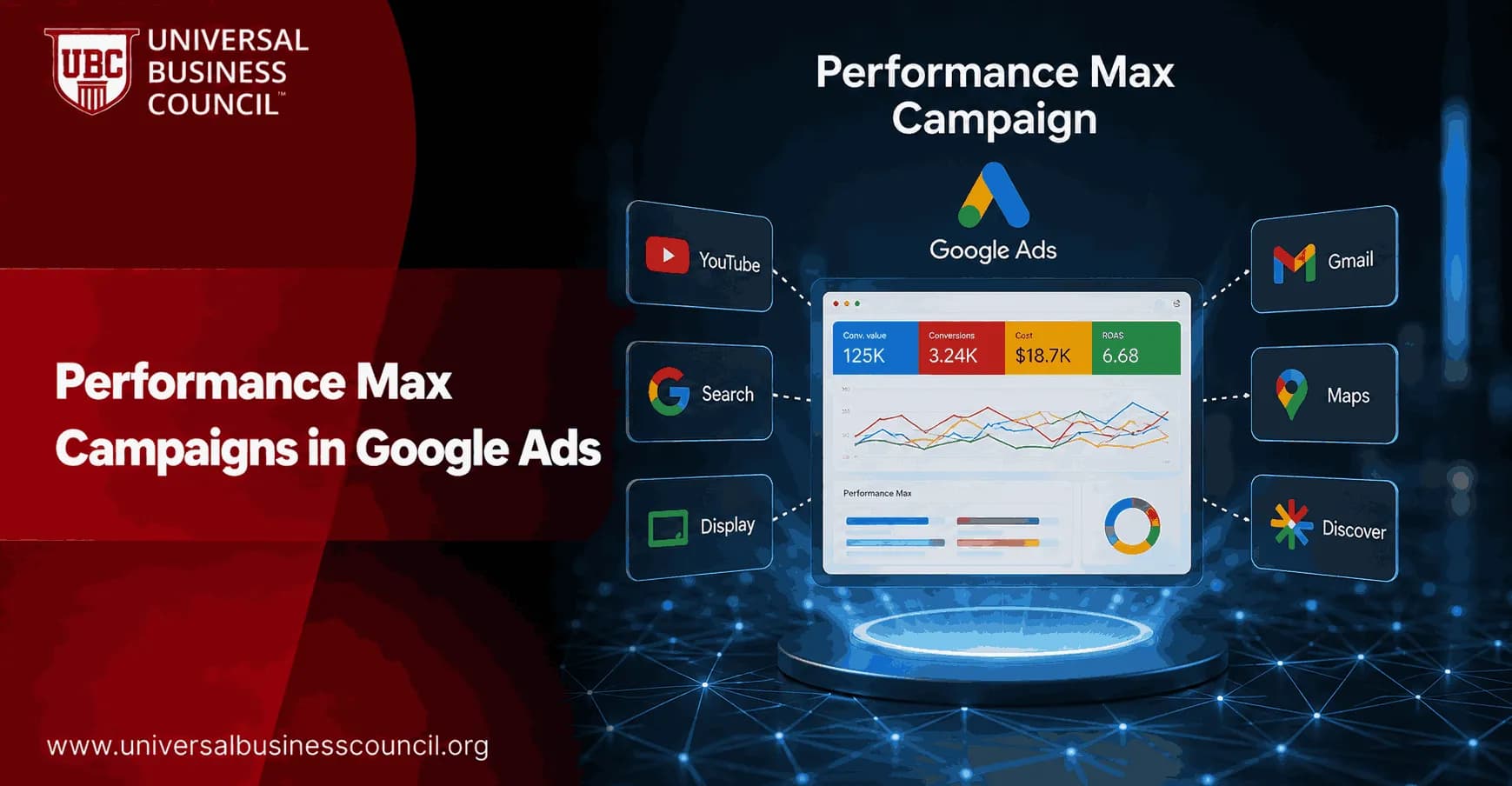
Performance Max campaigns use automation to find conversions across Search, Shopping, YouTube, Display, Discover, Gmail, and Maps from a single campaign. You set the business goal, budget, creative assets, audience signals, and conversion tracking. Google AI handles most of the bidding, placement selection, creative mixing, and audience expansion.
That sounds simple. It is not hands-off. Beginners usually run into trouble when tracking is weak, assets are thin, or the campaign is left to optimize toward low-quality leads. Used well, Performance Max adds reach beyond keyword-based Search. Treated as a black box, it burns budget quietly.

Managing Performance Max campaigns successfully requires a strong understanding of automation, conversion tracking, bidding strategies, and creative optimization. A Certified Google Ads Expert credential helps professionals build these practical skills, enabling them to guide AI-driven campaigns toward meaningful business outcomes rather than relying on automation alone.
What are Performance Max campaigns?
Performance Max, often called PMax, is a goal-based Google Ads campaign type built for performance advertisers. Google describes it as a way to access all Google Ads inventory from a single campaign while complementing your existing Search campaigns.
The key word is complementing. PMax should not automatically replace Search. Search still gives you tighter control over keywords, ad copy, and query intent. Performance Max is better at finding extra conversions across channels that would be hard to manage by hand.
Where Performance Max ads can appear?
A single PMax campaign can serve ads across:
Google Search
Shopping listings
YouTube
Google Display Network
Discover
Gmail
Google Maps
The practical point is simple. Your ads are not limited to one placement type, so your creative and measurement setup has to be ready for several different contexts at once.
How Performance Max works
You provide the inputs. Google makes the auction-level decisions. That trade-off is the whole model.
Inputs you control
Before launch, define the campaign structure carefully. These are the main inputs:
Conversion goals: purchases, lead forms, calls, store visits, subscriptions, or other actions that matter to the business.
Conversion values: revenue for ecommerce, estimated lead value for B2B, or values by lead type if not all leads are equal.
Bidding strategy: Maximize Conversions, Target CPA, or Target ROAS.
Creative assets: headlines, descriptions, images, logos, and video.
Audience signals: Customer Match lists, remarketing lists, website visitors, interests, and custom segments.
Feeds: product feeds for ecommerce or business data feeds for local and other formats.
Audience signals are not hard targeting. They are hints. Google can and often will go beyond them when it predicts a user might convert.
Performance Max delivers stronger results when it supports a broader digital marketing strategy instead of operating as a standalone advertising channel. A Certified Digital Marketing Expert credential helps professionals understand how paid media works alongside SEO, content marketing, analytics, email marketing, and customer journey optimization to improve overall campaign performance.
What Google AI decides
Performance Max uses machine learning to decide which channel to use, how much to bid, which audience to reach, and which creative combination to show. It also shifts budget across placements based on predicted conversion value.
Useful, yes. But it also means bad data spreads fast. If your campaign is optimizing for every form fill, including students, vendors, and unqualified inquiries, the algorithm will chase more of exactly those. In lead generation accounts, the first serious fix is often importing qualified stages from HubSpot or Salesforce, not rewriting ad copy.
When should beginners use Performance Max?
Use Performance Max when you have a clear conversion goal and enough data to give the system direction. It works well for ecommerce, local businesses, app campaigns, and lead generation programmes where you can track lead quality.
Good use cases
Ecommerce: connect a product feed and optimize toward purchase value with Target ROAS.
Local businesses: drive store visits, calls, and direction requests through Maps and local formats.
Subscription products: reach prospects across Search, YouTube, Display, and Discover without manually splitting every budget.
B2B lead generation: use qualified lead imports and Customer Match to steer the campaign toward better prospects.
When Performance Max is the wrong first move
Do not start with PMax if you have no conversion tracking, no creative assets, and no idea what a profitable customer is worth. Be careful too if your brand terms already carry most of your conversions. Without brand exclusions, PMax may take credit for demand you already had.
To be blunt, PMax can make weak measurement look successful. A dashboard may show a $42 cost per lead while the sales team says only one in ten leads is worth calling. Leadership does not track form fills for long. They track pipeline, CAC, LTV, revenue, and payback period.
Step-by-step setup guide for Performance Max campaigns
1. Define your real conversion goal
Start with the business outcome. For ecommerce, use purchase value. For B2B, avoid optimizing only to raw forms if you can import MQL, SQL, or closed-won stages instead. Google Ads optimizes better when conversion quality is visible.
2. Pick the right bidding strategy
Maximize Conversions: useful for newer accounts that need volume before you set strict targets.
Target CPA: best for lead generation when lead values are fairly consistent.
Target ROAS: best for ecommerce or revenue-based campaigns with reliable value tracking. Many practitioners prefer at least 30 recent conversions before setting aggressive ROAS targets.
Do not set a fantasy target on day one. If your current ROAS is 280 percent, asking for 700 percent immediately can throttle delivery. Start near reality, then tighten once the data settles.
3. Build asset groups around themes
An asset group is a collection of creative assets and signals. Keep each group tied to a clear product category, service line, or audience theme. A messy asset group with unrelated products gives the system poor creative options.
Provide multiple headlines, descriptions, images, logos, and at least one video. Google can auto-generate simple videos if you do not upload one, but do not rely on that for brand presentation. In 2024, Google also began tying ad strength more closely to both the number and diversity of assets.
4. Add audience signals
Use your best first-party data first:
Customer Match lists
Past purchasers
High-value customers
Remarketing audiences
Converted leads
Relevant custom segments based on search behavior or websites
If you work in a regulated or niche market, audience signals matter even more. They help the system start in the right neighborhood, even though they do not fence it in.
5. Apply controls before launch
Recent Google Ads updates have made Performance Max more manageable than it was at launch in late 2021. In 2024 and 2025, advertisers gained more options for campaign-level negative keywords, demographic exclusions, device controls, brand exclusions, placement visibility, and asset group reporting.
Use these controls with care:
Campaign-level negative keywords: block irrelevant terms for one PMax campaign without affecting the whole account.
Brand exclusions: separate branded demand from non-brand prospecting.
Device exclusions: reduce spend on devices that do not convert profitably.
Demographic exclusions: remove age or household income segments outside your market.
URL contains rules: guide product feed campaigns toward specific site categories.
The mistake is over-correcting. Exclude too much and you remove the discovery benefit that makes PMax worth running.
6. Let the learning phase run
Performance Max often needs 2 to 4 weeks to move through early learning and 6 to 8 weeks to become more stable. Avoid daily budget swings and constant bid changes. Weekly checks are fine. Major edits every two days are not.
How to optimize Performance Max after launch
Optimization is less about manual bids and more about feeding the system cleaner data and better constraints.
Reports to review
Asset group performance: compare themes, creative sets, and signals.
Search terms insights: understand query categories and add negatives where needed.
Budget reports: model spend scenarios and end-of-month pacing.
Network and placement reporting: check where ads are serving and watch brand safety.
Product performance: for ecommerce, spot products that spend heavily without enough margin or revenue.
Google has expanded these reporting tools after years of advertiser criticism. The direction is clear enough: more transparency and control, with automation still at the center.
Optimizing AI-powered campaigns also depends on technical capabilities such as analytics implementation, CRM integration, marketing automation, conversion data management, and API connectivity. A Tech Certification helps professionals strengthen these complementary technical skills, making campaign measurement, attribution, and optimization more accurate across complex advertising environments.
What results can beginners expect?
Google reports that advertisers see an average 13 percent increase in conversions when adding Performance Max to existing Search campaigns. Treat that as a benchmark, not a promise.
Google-published case studies show stronger results in selected examples. Rothy's reported a 60 percent increase in conversions and a 59 percent increase in revenue after using Performance Max. Discovery+ reported a 21 percent lower CPA compared with previous non-branded Search campaigns. ManyPets reported a 21 percent increase in sales.
These are curated success stories. Your own results depend on tracking quality, offer strength, market competition, budget, creative quality, and how well you use exclusions.
Skills you need to manage Performance Max well
PMax cuts manual campaign work, but it raises the bar for strategy. You need to understand conversion tracking, creative testing, customer value, and analytics. If you are building a career in paid media, pair hands-on Google Ads practice with structured study in digital marketing, marketing analytics, and campaign management.
Universal Business Council readers may want to explore related digital marketing, marketing management, and business analytics certification pathways. Those areas support the real work behind Performance Max: setting commercial goals, reading CAC and LTV correctly, and explaining results to leadership.
Final advice for your first Performance Max campaign
Start with one clear goal, clean conversion tracking, strong creative assets, and a budget you can leave alone during learning. Keep Search campaigns running, especially for high-intent and brand-controlled terms. Add campaign-level negatives and brand exclusions where needed, then improve the campaign weekly using asset, search, budget, and placement reports.
Your next step is simple. Audit your conversion actions before you launch. If the campaign is told to chase the wrong outcome, Google AI will do exactly that, very efficiently.
As artificial intelligence, machine learning, predictive analytics, and automation continue to transform digital advertising, earning a Deep Tech Certification can help professionals develop a broader understanding of the technologies behind modern AI-driven marketing platforms. This knowledge supports better strategic decision-making and prepares marketers for the continued evolution of intelligent advertising systems.
FAQs
1. What is a Performance Max campaign in Google Ads?
Performance Max (PMax) is a goal-based campaign type that uses Google's AI to deliver ads across multiple Google channels from a single campaign. Depending on eligibility and campaign settings, ads may appear across Search, YouTube, Display, Discover, Gmail, Maps, and other Google properties to help achieve specified conversion goals.
2. How do Performance Max campaigns work?
Performance Max combines audience signals, creative assets, conversion goals, bidding strategies, and Google's machine learning to determine where and when ads should appear. The system continuously optimizes placements and bidding based on performance data and campaign objectives.
3. Who should use Performance Max campaigns?
Performance Max can be suitable for businesses seeking to increase online sales, generate leads, drive store visits, or achieve other measurable conversion goals. It is commonly used by e-commerce businesses, local service providers, retailers, and organizations looking to reach customers across multiple Google channels.
4. What are the benefits of Performance Max?
Performance Max simplifies campaign management by consolidating multiple advertising channels into a single campaign. It also uses AI to automate bidding, audience expansion, asset selection, and budget allocation while providing access to Google's broad advertising inventory.
5. Are Performance Max campaigns suitable for beginners?
Yes. Performance Max can be accessible for beginners because many optimization tasks are automated. However, advertisers still need accurate conversion tracking, quality creative assets, clear business objectives, and regular performance reviews to achieve effective results.
6. What assets are required for Performance Max?
Advertisers typically provide headlines, long headlines, descriptions, images, logos, videos where available, business information, audience signals, and landing page URLs. Google's AI combines these assets into different ad formats depending on the placement and user context.
7. What are audience signals?
Audience signals provide Google's AI with initial guidance about the types of users who may be interested in a business. These signals can include customer lists, website visitors, custom segments, demographic information, or interests, although the AI may expand beyond them during optimization.
8. How important is conversion tracking?
Accurate conversion tracking is essential because Performance Max relies heavily on conversion data to optimize bidding and campaign delivery. Without reliable measurement, the AI may struggle to identify valuable customer actions and allocate budgets efficiently.
9. Which bidding strategies work with Performance Max?
Performance Max commonly supports automated bidding strategies such as Maximize Conversions, Maximize Conversion Value, Target CPA, and Target ROAS where appropriate. The most suitable strategy depends on campaign objectives, available conversion data, and business goals.
10. How does AI optimize Performance Max campaigns?
Google's AI analyzes signals such as user intent, audience behavior, device, location, time, creative performance, and historical conversion data to optimize bidding, placements, and asset combinations. Continuous learning allows the system to adjust campaign delivery as new data becomes available.
11. Can advertisers control where ads appear?
Performance Max offers less manual placement control than some traditional campaign types because Google's AI determines where ads are most likely to achieve campaign goals. However, Google continues to introduce additional reporting and campaign controls, so advertisers should review the latest official documentation for available options.
12. Which metrics should beginners monitor?
Important metrics include impressions, click-through rate (CTR), conversions, conversion rate, cost per acquisition (CPA), return on ad spend (ROAS), conversion value, customer acquisition cost (CAC), asset performance, and overall business outcomes rather than clicks alone.
13. How should businesses create effective assets?
Assets should clearly communicate the business value proposition, include high-quality visuals, maintain consistent branding, feature compelling calls to action, and direct users to relevant landing pages. Refreshing creative assets periodically can help maintain campaign effectiveness.
14. What common mistakes should beginners avoid?
Common mistakes include launching campaigns without conversion tracking, providing limited creative assets, setting unrealistic performance expectations, making frequent changes before sufficient data is collected, ignoring asset quality, and relying solely on automation without reviewing campaign performance.
15. How long should advertisers wait before evaluating results?
Performance Max campaigns often require a learning period while Google's AI gathers sufficient performance data. Advertisers should generally allow adequate time for optimization before making significant adjustments, while continuing to monitor conversion tracking and campaign health.
16. Can Performance Max replace Search campaigns?
Performance Max does not necessarily replace Search campaigns in every advertising strategy. Many businesses use both campaign types together, allowing Search campaigns to target specific high-intent keywords while Performance Max expands reach across Google's broader advertising ecosystem.
17. Is Performance Max suitable for local businesses?
Yes. Local businesses can use Performance Max to promote products, services, appointments, store visits, or local awareness across multiple Google properties. Success depends on accurate business information, conversion tracking, geographic targeting, and relevant creative assets.
18. How is Performance Max evolving in 2026?
Google continues to enhance Performance Max with improved reporting, additional campaign controls, expanded AI capabilities, better asset insights, and stronger privacy-focused measurement. Advertisers should monitor official Google Ads updates as new features become available.
19. How can businesses maximize Performance Max results?
Businesses can improve results by implementing accurate conversion tracking, providing diverse creative assets, maintaining high-quality landing pages, supplying meaningful audience signals, monitoring asset performance, evaluating AI recommendations, and aligning campaigns with measurable business objectives.
20. What is the best beginner strategy for Performance Max campaigns?
The most effective beginner approach is to establish reliable conversion tracking, define clear campaign goals, upload strong creative assets, provide useful audience signals, choose an appropriate automated bidding strategy, and allow Google's AI sufficient time to learn before making major optimizations. As Performance Max continues to evolve, advertisers who combine automation with regular performance analysis and strategic oversight are more likely to achieve sustainable long-term results. AI can handle millions of auction decisions in seconds, but it still appreciates humans who remember to upload good images instead of blurry logos from 2014.
Related Articles
View All
Digital Marketing
Google Ads for Beginners: The Complete PPC Starter Guide
A beginner-friendly Google Ads guide covering PPC setup, keywords, bidding, budgets, tracking, metrics, and a practical 30-day launch plan.

Digital Marketing
Google Ads Remarketing Guide: How to Re-Engage Website Visitors
A practical Google Ads remarketing guide for re-engaging website visitors with audience segmentation, dynamic ads, RLSA, first-party data, and better measurement.

Digital Marketing
Best Google Ads Course Topics Every Beginner Should Learn
Learn the essential Google Ads course topics beginners need, from campaign setup and keywords to GA4 tracking, Smart Bidding, and Performance Max.
Trending Articles
The Role of Blockchain in Ethical AI Development
How blockchain technology is being used to promote transparency and accountability in artificial intelligence systems.
AWS Career Roadmap
A step-by-step guide to building a successful career in Amazon Web Services cloud computing.
Top 5 DeFi Platforms
Explore the leading decentralized finance platforms and what makes each one unique in the evolving DeFi landscape.