

Best Google Ads Course Topics Every Beginner Should Learn
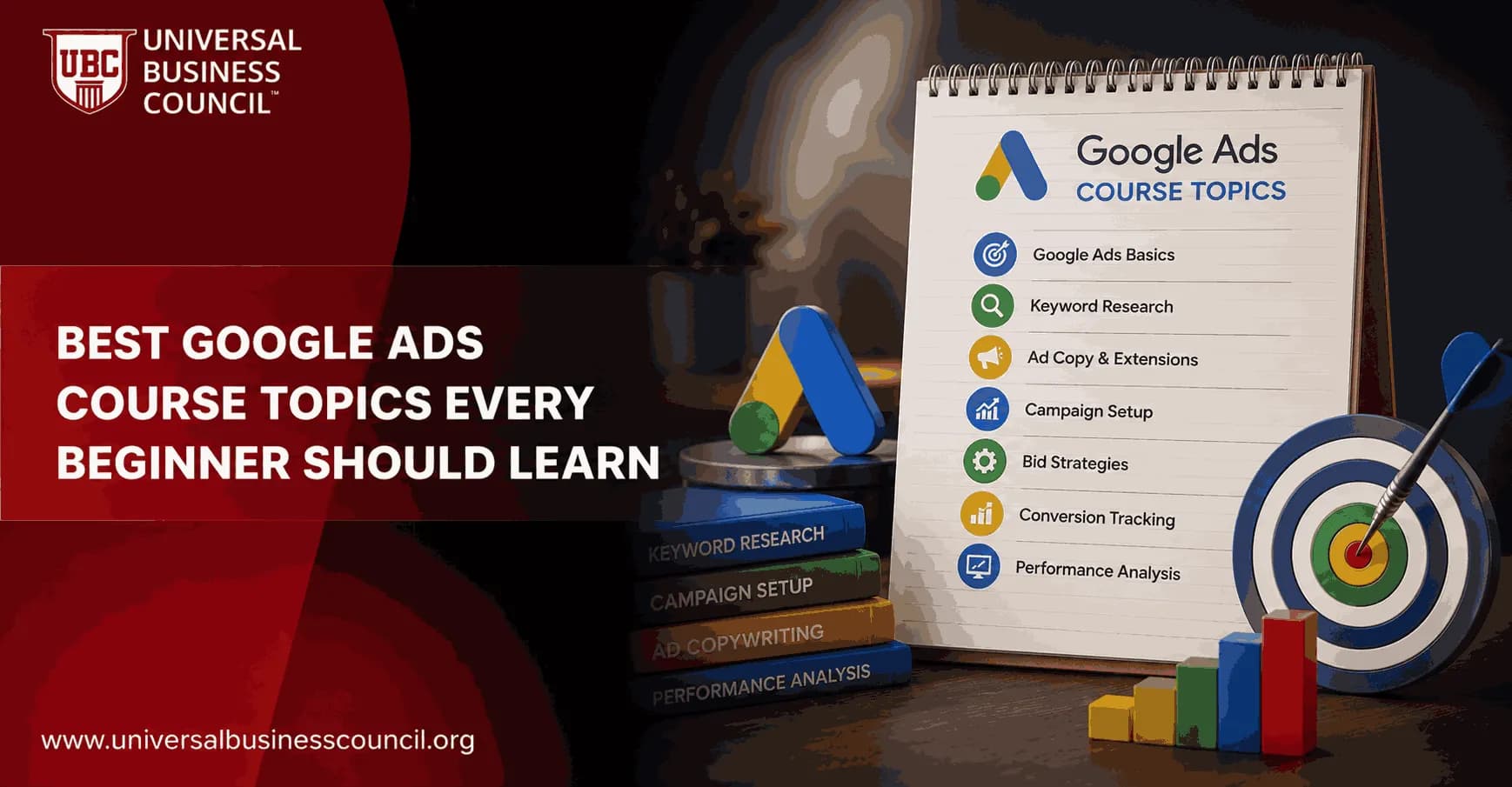
Google Ads course topics for beginners should teach you how to launch a campaign, measure it correctly, and fix it when performance starts to drift. Button-clicking is not enough. A useful beginner curriculum covers account setup, campaign structure, keywords, bidding, ad copy, audiences, GA4 measurement, Performance Max, and privacy-first tracking.
That may sound like a lot. It is. But the order matters. If you learn conversion tracking after you spend your first budget, you are already late. I have watched new advertisers run a lead campaign for two weeks, celebrate a low CPC, then discover every page view had been imported as a conversion. Cheap clicks. Bad data. No pipeline.

As Google Ads evolves with AI-powered automation, advanced bidding strategies, and privacy-focused measurement, marketers need more than basic platform familiarity. A Certified Google Ads Expert credential helps professionals develop practical skills in campaign management, optimization, conversion tracking, and performance analysis that support long-term advertising success.
What Makes a Good Beginner Google Ads Course?
A good course takes you from a blank account to a live campaign, then into reporting and optimization. Google Skillshop structures official learning around Search, Display, Video, Apps, Shopping, and Measurement certifications. Coursera's beginner project focuses on account creation, first campaign setup, ad groups, keyword research, audience targeting, and ad writing. CXL's beginner course compresses the basics into a short set of lessons you can finish in an afternoon.
The better courses do not stop at classic search ads. Current training now includes Performance Max, Smart Bidding, GA4, Google Tag Manager, Demand Gen, and consent-aware measurement. That is not advanced trivia anymore. It is the daily work.
If you are building a broader marketing skill set, this is also where Universal Business Council learners can connect Google Ads study with related digital marketing, business analytics, and marketing management certification paths. Paid search sits between strategy, data, and execution.
Google Ads Account Setup and Platform Basics
Start here. No shortcuts.
You need to understand the account hierarchy before you touch budgets:
Account: billing, access, and top-level settings
Campaign: objective, budget, bidding, location, and network settings
Ad group: keywords, audiences, ads, and assets
Ads and assets: the creative units users actually see
A beginner course should also explain the core terms: impressions, clicks, CTR, CPC, conversions, conversion rate, cost per conversion, ROAS, and impression share. These are not just dashboard labels. They are the language you will use when a manager asks why spend rose by 18 percent but leads stayed flat.
Understanding Google Ads is most effective when it fits within a broader marketing strategy that includes customer acquisition, analytics, content, and conversion optimization. Many professionals strengthen these capabilities through a Certified Digital Marketing Expert program that provides a comprehensive view of digital marketing performance across multiple channels.
Campaign Types and When to Use Each One
Many beginners assume Google Ads means search ads. Search matters, but it is only one part of the platform.
Search Campaigns
Use Search when demand already exists. If someone types "emergency electrician near me" or "B2B payroll software demo," they are giving you intent. Search campaigns are often the best first lesson because keywords, ad copy, landing pages, and conversion tracking are easy to connect.
Display and Video Campaigns
Display campaigns run across the Google Display Network. Video campaigns commonly run on YouTube. These are better for awareness, remarketing, and education. They can waste money quickly if you measure them like bottom-funnel search. A view is not a lead.
Performance Max and Demand Gen
Performance Max uses Google's automation across Search, Display, YouTube, Gmail, Discover, and Maps. Demand Gen is built for visual, discovery-style placements across Google surfaces. Modern courses should introduce both early, but with a warning: automation needs clean conversion data. If your tracking is messy, Performance Max will optimize toward the wrong signals.
Keyword Research, Intent, and Match Types
Keyword research is still a core Google Ads course topic. Even with automation, you need to know how people search.
A beginner should learn how to:
Use Google Keyword Planner to estimate search volume and competition
Separate high-intent terms from research terms
Group keywords by service, product, or buyer problem
Build negative keyword lists before launch
Use exact, phrase, and broad match with intention
To be blunt, broad match is often introduced too casually. It can work well with Smart Bidding and strong conversion data. In a new account with weak tracking, it can burn budget on vague or unrelated searches. Review the search terms report. Early. Often.
Bidding Strategies, Budgets, and Smart Bidding
Your bidding strategy tells Google what you want the system to prioritize. A good course explains both manual and automated bidding, not as theory but as business choices.
Key bidding topics include:
Manual CPC: useful for learning control, less common at scale
Maximize Clicks: risky if you care about lead quality
Maximize Conversions: useful when conversion tracking is reliable
Target CPA: best when you know your acceptable cost per acquisition
Target ROAS: useful for e-commerce accounts with revenue tracking
Daily budgets matter too. Google's own documentation notes that campaigns may spend more than the daily budget on some days, while averaging out over the month based on monthly charging limits. Beginners need to know this before a client spots a high-spend Tuesday and panics.
Ad Copy, Responsive Search Ads, and Assets
Good ads match the searcher's intent and give a clear next step. Not clever. Clear.
Beginner courses should teach you how to write responsive search ads with varied headlines, benefit-led descriptions, and strong calls to action. They should also cover ad assets such as sitelinks, callouts, structured snippets, image assets, lead form assets, and call assets.
A small detail that trips up new advertisers: repeating the same headline idea 15 ways does not help a responsive search ad. Give Google different angles to test. Price. Trust proof. Speed. Service area. Product category. A guarantee, if you can legally and operationally stand behind it.
Audience Targeting and Segmentation
Keywords capture intent. Audiences add context.
A beginner Google Ads course should cover demographic targeting, in-market segments, custom segments, remarketing, customer match, and audience observation versus targeting. That last distinction matters. In Search, observation lets you collect audience performance data without restricting reach. Targeting narrows the campaign to that audience.
For many new accounts, I prefer observation first. Let the data show whether returning visitors, certain age groups, or in-market audiences perform better before you cut traffic too aggressively.
Conversion Tracking, GA4, and Google Tag Manager
This is the topic I would test first in any serious course. If measurement is wrong, optimization is theater.
Google replaced Universal Analytics with GA4 for standard properties in 2023, so any current beginner course should teach GA4. It should also show how to connect GA4 to Google Ads, mark key events, and import the right conversions.
You should learn:
How to define a lead, sale, phone call, booking, or qualified action
How to install tags with Google Tag Manager
How to test events using GA4 DebugView and Tag Assistant
The difference between primary and secondary conversions in Google Ads
How consent mode and privacy rules affect measurement
Here is the common mistake: importing too many GA4 events as primary conversions. Scrolls, page views, and button clicks can be useful diagnostic events. They are rarely business outcomes. Keep primary conversions tied to actions that create revenue or qualified pipeline.
Modern advertising platforms also depend on technologies such as analytics systems, APIs, cloud infrastructure, automation, and data privacy frameworks. Pursuing a broader Tech Certification can help professionals better understand these technical foundations, making it easier to manage reliable tracking and optimize campaign performance.
Reporting, Optimization, and Troubleshooting
Launching a campaign is the easy part. Managing it is the job.
Beginner training should teach you how to read reports and make decisions from them. Focus on the metrics leadership actually tracks:
Cost per lead or cost per acquisition
Conversion rate
ROAS for e-commerce
Lead quality and sales acceptance rate
Search impression share
Lost impression share due to budget or rank
Optimization is not random tinkering. Check search terms. Pause waste. Add negatives. Improve landing pages. Test assets. Shift budget toward campaigns with stronger economics. If a campaign has low impressions, check keywords, bids, budget, policy status, and targeting restrictions before rewriting every ad.
Landing Pages and Conversion Rate Basics
Some Google Ads courses underteach landing pages. That is a mistake.
You can write excellent ads and still lose money if the page is slow, vague, or disconnected from the search query. A beginner should know how to evaluate message match, page speed, form length, trust signals, mobile usability, and call tracking. Google has long stated that landing page experience is part of ad quality, along with expected CTR and ad relevance.
For lead generation, shorter forms often increase volume, but they can reduce quality. For B2B, adding one qualification field can sometimes save sales teams hours. Do not optimize only for form fills. Optimize for useful leads.
Strategy, SEO, and the Wider Marketing Stack
Google Ads does not live alone. A strong beginner course should connect paid search with SEO, content strategy, CRM data, and business goals.
Learn how paid and organic search support each other. Paid search can test messaging quickly. SEO can reduce long-term dependence on paid clicks. CRM tools such as HubSpot and Salesforce can show whether Google Ads leads turn into opportunities and customers. That is where CAC and LTV become more useful than CPC.
This is a natural internal link point for Universal Business Council content on digital marketing strategy, marketing analytics, and business management certification routes.
Best Learning Path for Beginners
If you are starting from zero, follow this order:
Set up a Google Ads account and learn the interface.
Build one simple Search campaign with tight ad groups.
Install GA4 and Google Tag Manager before launch.
Write responsive search ads and add key assets.
Review search terms and add negative keywords after launch.
Learn Smart Bidding only after conversion tracking works.
Study Performance Max and Demand Gen once you understand objectives and measurement.
Use Google Skillshop to prepare for official platform certifications.
Connect the skill to broader marketing study through Universal Business Council programmes.
Final Takeaway
The best Google Ads course topics are the ones that prepare you for real account work: structure, intent, bidding, creative, tracking, reporting, and business judgment. Do not choose a course that teaches only where to click. Choose one that makes you explain why a campaign should exist, how success will be measured, and what you will change when the numbers disappoint.
Your next step: build a small practice campaign plan on paper, including keywords, ads, budget, landing page, and GA4 conversions. Then study Google Skillshop for platform knowledge and pair it with a Universal Business Council digital marketing learning path to strengthen the strategy behind the clicks.
As artificial intelligence, automation, predictive analytics, and privacy-enhancing technologies continue to reshape digital advertising, combining marketing expertise with technical knowledge is becoming increasingly valuable. A Deep Tech Certification offers structured learning that helps professionals understand the emerging technologies driving the future of digital marketing and business growth.
FAQs
1. What should beginners learn first in Google Ads?
Beginners should start by understanding how Google Ads works, including campaign objectives, keywords, bidding strategies, ad formats, Quality Score, and conversion tracking. Building a strong foundation makes it easier to optimize campaigns as skills develop.
2. Why is learning Google Ads valuable?
Google Ads is one of the most widely used digital advertising platforms for reaching customers who are actively searching for products and services. Learning the platform can benefit business owners, marketers, freelancers, agencies, and professionals pursuing careers in digital marketing.
3. What are the main types of Google Ads campaigns?
Google Ads supports several campaign types, including Search, Display, Shopping, Video, App, Performance Max, and Demand Gen campaigns. Each format serves different marketing objectives, audiences, and stages of the customer journey.
4. What is keyword research in Google Ads?
Keyword research is the process of identifying the search terms potential customers use when looking for products or services. Effective keyword selection helps advertisers reach relevant audiences while improving campaign performance and budget efficiency.
5. Why are keyword match types important?
Keyword match types determine how closely a user's search must match your selected keywords before an ad is eligible to appear. Understanding broad match, phrase match, and exact match helps beginners balance reach with targeting precision.
6. What is Google Ads Quality Score?
Quality Score is Google's estimate of the relevance and quality of your keywords, ads, and landing pages. While the exact calculation is proprietary, factors such as expected click-through rate, ad relevance, and landing page experience can influence the score.
7. How do bidding strategies work?
Google Ads offers manual and automated bidding strategies that optimize campaigns for goals such as clicks, conversions, conversion value, or impression share. Beginners should learn when to use each approach based on campaign objectives and available performance data.
8. Why is ad copywriting an essential course topic?
Well-written ad copy helps attract qualified visitors, communicate value clearly, and encourage users to take action. Beginners should learn how to write compelling headlines, persuasive descriptions, and effective calls-to-action while matching user search intent.
9. What should beginners know about landing pages?
Landing pages should closely align with the advertisement, load quickly, work well on mobile devices, and provide a clear path toward conversion. An effective landing page supports both user experience and advertising performance.
10. What is conversion tracking?
Conversion tracking measures valuable actions such as purchases, form submissions, phone calls, or newsletter sign-ups after users interact with an ad. Accurate tracking allows advertisers to evaluate campaign performance and make informed optimization decisions.
11. How important is audience targeting?
Audience targeting helps advertisers reach users based on characteristics such as interests, demographics, previous website interactions, or purchase intent. Combining audience signals with keyword targeting can improve campaign relevance and efficiency.
12. What is remarketing in Google Ads?
Remarketing allows businesses to re-engage people who previously visited their website or interacted with their app or content. It is commonly used to increase brand recall, recover abandoned shopping carts, and encourage repeat conversions.
13. Why should beginners learn Performance Max campaigns?
Performance Max campaigns use Google's AI to optimize ad delivery across multiple Google properties using a single campaign. Beginners should understand both the benefits of automation and the importance of providing high-quality creative assets and accurate conversion data.
14. What metrics should every beginner understand?
Key metrics include impressions, clicks, click-through rate (CTR), conversion rate, cost per click (CPC), cost per acquisition (CPA), return on ad spend (ROAS), Quality Score, impression share, and conversion value. Understanding these metrics helps advertisers measure campaign success beyond simple traffic numbers.
15. Why is A/B testing important?
A/B testing compares different versions of ads, landing pages, headlines, calls-to-action, or bidding strategies to identify which performs better. Continuous testing helps beginners improve campaigns using real performance data rather than assumptions.
16. How does AI support Google Ads management?
AI assists with automated bidding, audience targeting, asset optimization, budget allocation, predictive insights, and campaign recommendations. While automation can improve efficiency, beginners should also learn how to interpret results and maintain strategic oversight.
17. What common mistakes should beginners avoid?
Common mistakes include choosing overly broad keywords, ignoring negative keywords, failing to install conversion tracking, sending traffic to poor landing pages, neglecting mobile optimization, setting unrealistic budgets, and making campaign changes without sufficient data.
18. Are Google Ads certifications worth earning?
Google Ads certifications can help demonstrate knowledge of the platform and may strengthen professional credibility for job seekers, freelancers, and agency professionals. However, practical experience managing real campaigns remains equally important for developing long-term expertise.
19. How can beginners continue improving after completing a course?
New advertisers should apply their knowledge by managing campaigns, reviewing performance reports, experimenting with new features, following official Google Ads documentation, and staying informed about platform updates and evolving digital marketing best practices.
20. What are the best Google Ads course topics every beginner should learn?
A comprehensive beginner course should cover campaign types, keyword research, bidding strategies, Quality Score, ad copywriting, landing page optimization, audience targeting, remarketing, conversion tracking, analytics, AI-powered campaign management, and ongoing optimization techniques. Mastering these core topics provides a strong foundation for building effective advertising campaigns and adapting to future changes in the Google Ads ecosystem. Digital advertising changes constantly, but the basics remain surprisingly stubborn. Learn those well, and you'll spend more time improving campaigns and less time wondering where the budget mysteriously wandered off.
Related Articles
View All
Digital Marketing
Google Ads Metrics Every Marketer Should Track for Better Campaign Decisions
Learn the Google Ads metrics that matter most, from CTR and CPC to CPA, ROAS, Quality Score, impression share, and ROI-focused reporting.
Digital Marketing
Google Ads Landing Pages: Best Practices for 2026
Learn how to build Google Ads landing pages that match search intent, load fast on mobile, improve conversion tracking, and support smarter campaign optimization.

Digital Marketing
How to Learn Google Ads Fast: Skills, Tools, and a 4-Week Practice Plan
Learn Google Ads fast with a practical 4-week plan covering Search campaigns, conversion tracking, optimization, automation, and certification prep.
Trending Articles
The Role of Blockchain in Ethical AI Development
How blockchain technology is being used to promote transparency and accountability in artificial intelligence systems.
AWS Career Roadmap
A step-by-step guide to building a successful career in Amazon Web Services cloud computing.
Top 5 DeFi Platforms
Explore the leading decentralized finance platforms and what makes each one unique in the evolving DeFi landscape.